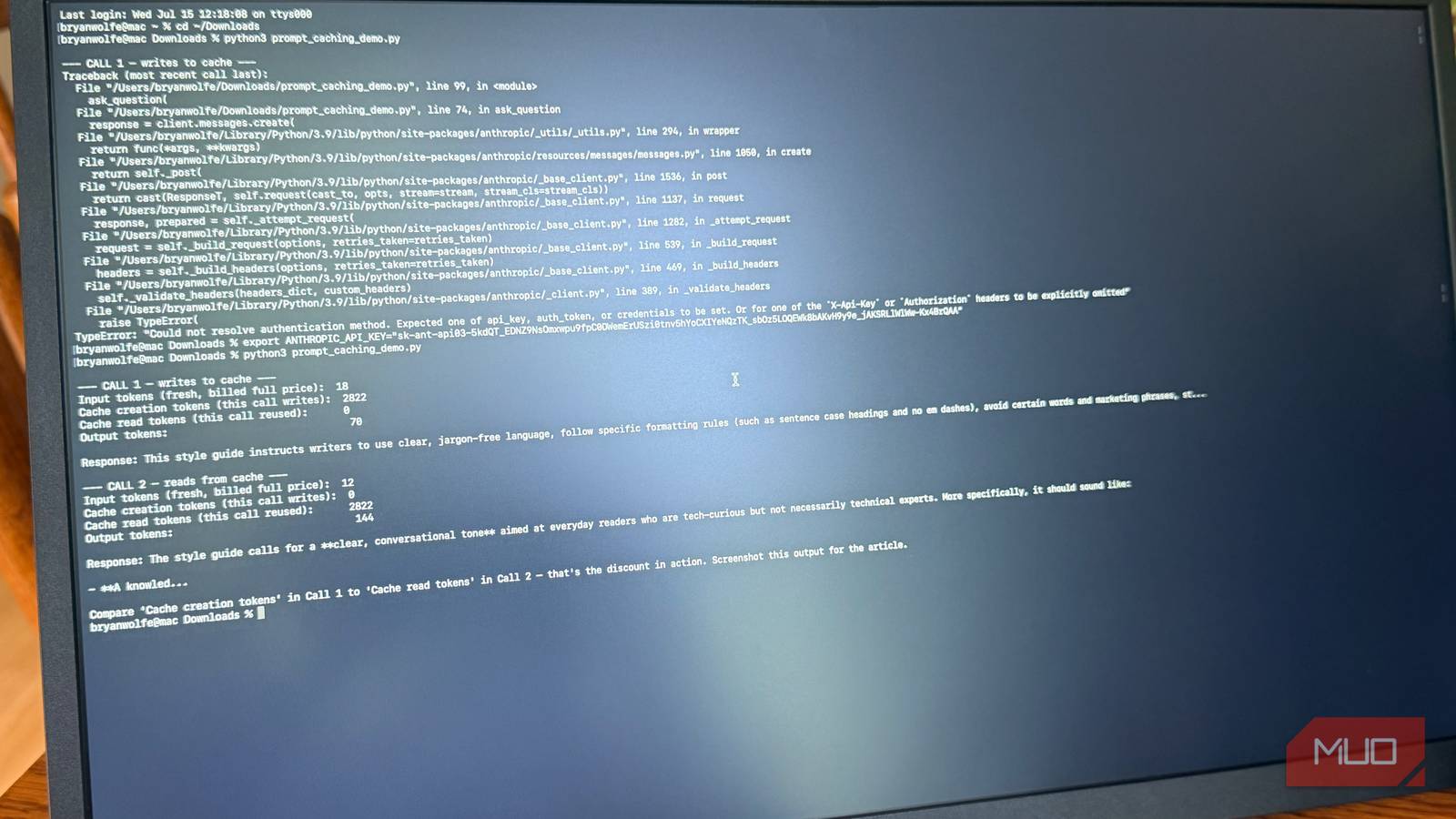
If you’ve built anything with Claude’s API, you already know token costs add up fast, especially once you’re sending the same system prompt, the same reference document, or the same long conversation history with every single call. What most people miss is that Anthropic has already built a fix for this, and it can cut your input costs by up to 90 percent when the same content is reused, without altering the model’s actual output. It’s just another example of how Claude’s growing lineup of products makes doing tasks easier than before.
The trick is called prompt caching.
Prompt caching lets you mark a chunk of this prompt, like a system prompt, a style guide, a big reference document, or your tool definitions, as reusable. The first time you send it, Claude processes it normally and stores it. Every subsequent request that reuses that same block reads it from cache instead of reprocessing it from scratch, and cached reads cost a fraction of the standard input price.
How much does prompt caching actually save you
The real cost breakdown
Here’s what makes this different from just writing a shorter prompt: you’re not sacrificing context plus instructions to save money. You can keep a massive system prompt, a full knowledge base, or dozens of examples in every request, and only the new part of your message gets billed at full price.
In practice, the math looks like this: a cache hit costs about 10 percent of the standard input price, which is a 90 percent discount on that portion of your request. The catch is that writing something to cache the first time costs slightly more than normal, roughly 1.25 times the base rate for a short-lived cache or two times for a longer one. But that writing cost pays for itself quickly. If you reuse the same content even once or twice more, you come out ahead, and every call after that is nearly free for that chunk of the prompt.
This is exactly why it matters for agentic tools. Anything that calls Claude repeatedly with the same set of instructions, like a coding assistant, a customer support bot, or a research tool that keeps a document loaded across many questions, ends up paying full price over and over for content that never changes. Turning on caching means you pay once and get a steep discount every time after.
Combine prompt caching with the Batch API for maximum savings
A worked example of the savings
If you don’t need an instant response, there’s a second lever worth pulling. Anthropic’s Batch API processes requests asynchronously, usually within an hour or two, and knocks 50 percent off both input and output token costs. The batch discount and the prompt caching discount aren’t mutually exclusive. You don’t have to choose between them — they stack when both apply.
That combination is where the “pennies per task” part comes in. A workload that caches a large reusable prompt and runs it through batch processing can end up costing a small fraction of what the same task would cost if sent one request at a time with no caching. For high-volume, non-urgent workloads like bulk document processing, content classification, or nightly report generation, this combination is the single biggest cost lever available.
Imagine you’re building a tool that answers questions against a 50-page reference document. Every question you send must include that document as context, since the model doesn’t retain anything from a previous request. Without caching, you’re paying the full input rate on that document every single time someone asks a question, even if a hundred people ask a hundred different questions about the exact same document in the same afternoon.
With caching enabled, the first query incurs a small premium for writing the document to the cache. Every question after that, as long as that cache remains active, reads the document at roughly a tenth of the normal cost. If you’re fielding dozens or hundreds of questions against the same material, the document itself costs next to nothing after that first run. The only part you’re paying full price for is the actual question being asked, which usually accounts for a tiny fraction of the total tokens in the request.
It’s why coding assistants and support bots see such massive savings. Their system prompts, tool definitions, and reference material are enormous compared to the actual exchange of a conversation, and none of that overhead changes from one message to the next.
Prompt caching mistakes that quietly cost you money
How to set up prompt caching correctly

Caching only works if the content you’re trying to cache is identical, byte-for-byte, between requests. A few things can silently break that without throwing any errors. Baking a timestamp, request ID, or dynamic date into your system prompt means the cache never matches, and you’ll pay full price every time. Sending structured data with keys in a different order each run might look the same to you, but Claude sees it as a brand-new prompt. And putting variables, like a user’s name or a unique query, before your massive system prompt instead of after it will also break the match.
The fix for all of these is the same: keep the stable, reusable part of your command first, and put anything that varies from request to request at the end, after the cache breakpoint. Check your usage data after you set this up, too. Anthropic’s API returns fields showing exactly how many tokens were written to cache versus read from it, so you can confirm the discount is actually kicking in rather than assuming it is.
How to actually turn it on
Prompt caching isn’t automatic in every context. When you’re calling the API directly, you add a cache breakpoint marker to the part of the input you want reused. There’s a minimum length your cached block needs to hit before it’s eligible, generally around 1,024 tokens, depending on the model, so this works best with larger, more complex prompts, not one-line instructions.
If you’re using Claude Code instead of calling the raw API, you don’t need to do anything. It automatically caches your system prompt, tool definitions, and project instructions behind the scenes at every turn.
Should you turn on prompt caching?
Prompt caching is one of those features that has been tucked away in Anthropic’s documentation the whole time, sitting there waiting for anyone building on the API, but it’s easy to miss if you’re just sending straightforward one-off requests. Once your use case involves repeating the same content across multiple calls — which describes most real applications — turning on caching and batching can make the difference between a project that scales affordably and one that drains your wallet. In other words: reuse the same content, turn on caching, and batch when you can to keep costs low.
Pricing details and current model rates change periodically, so it’s worth checking Anthropic’s official pricing page before estimating costs for a specific project. You should also read how you can teach ChatGPT and Gemini, one thing Claude does by default, and the responses are better than ever.

- Developer
-
Anthropic PBC
- Price model
-
Free, subscription available
Claude is an advanced artificial intelligence assistant developed by Anthropic. Built on Constitutional AI principles, it excels at complex reasoning, sophisticated writing, and professional-grade coding assistance.