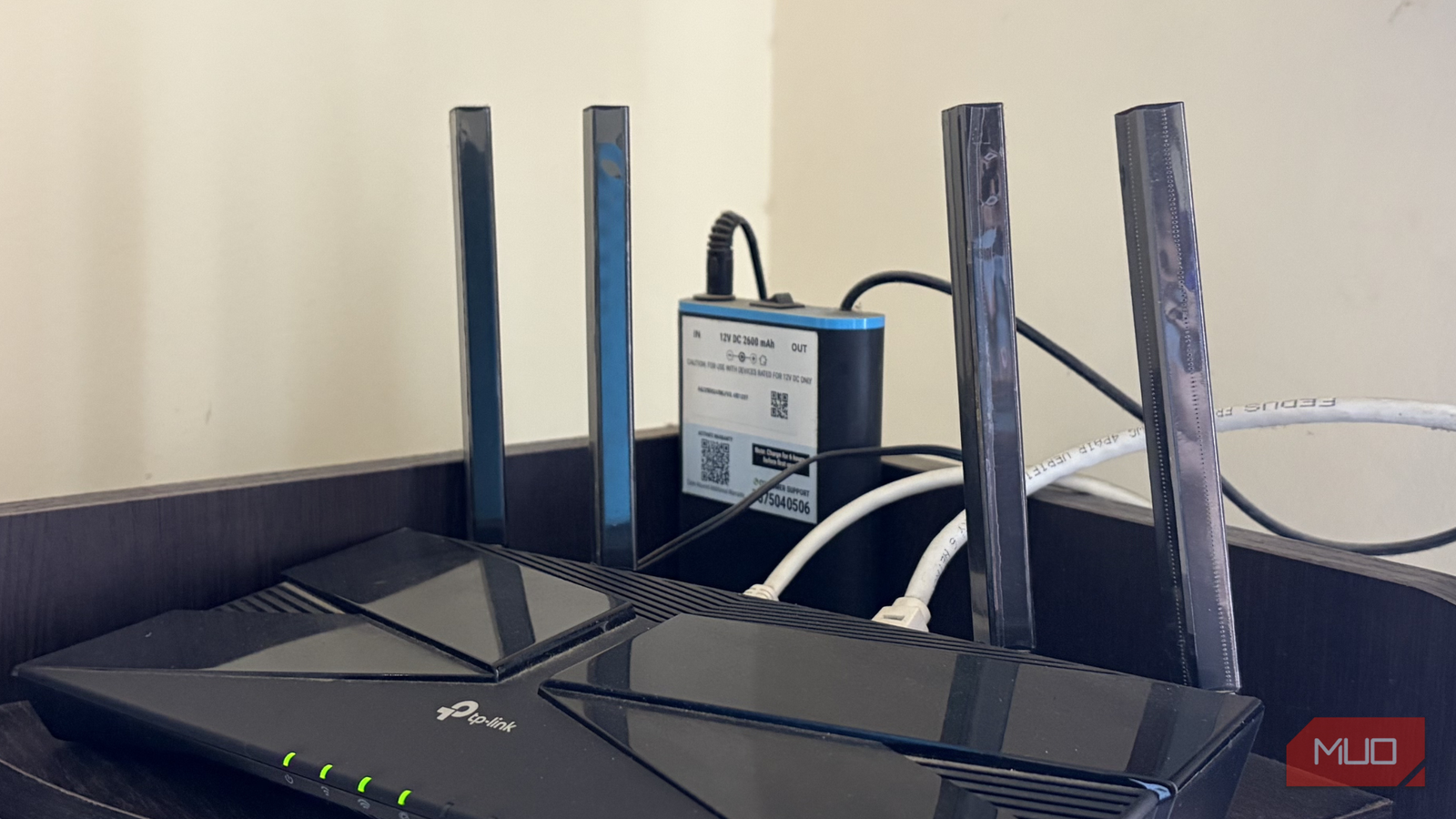
I live in a part of town where power cuts are less of an “if” and more of a “when.” Sometimes it’s a five-minute flicker while the grid sorts itself out, and sometimes it’s a proper hour-long blackout that has me hunting for candles like it’s the 1800s. I’d made peace with the lights going out. What I could never make peace with was my internet dying along with them.
So after one too many outages left me offline, I took matters into my own hands and bought a UPS. It cost way less than I was expecting, and finally meant my NAS and Plex Media Server were always online when I needed them.
The fix was smaller than I expected
The small brick that outsmarts a blackout
For the longest time, I figured backing up my network meant buying one of those big, heavy UPS units. Way more than I needed, honestly, when all I wanted to keep alive was a router and an ONT that, together, sip maybe 20–30W. Then I came across the mini router UPS, or a DC UPS, as some brands like to call it. It’s a small brick, roughly the size of a paperback, that sits between your wall socket and your router.
It has a battery inside, and when the power drops, it switches over so smoothly that your router never even notices. It doesn’t reboot or drop the connection, so there’s no waiting around for everything to crawl back to life. The best part is the price. I paid a little under $20 for my 2,600mAh model, but you’ll find these floating around the $20-300 range, depending on capacity. That’s still a fraction of what a full-sized UPS costs, even moving towards the top end of the scale. For something that keeps my most-used utility alive, the math worked out instantly.
Setting up the tiny UPS was effortless
Plug it in and basically forget it exists

There isn’t much of a setup story here, and that’s exactly the point. I checked the sticker on the bottom of my router to confirm its power rating, plugged the UPS into the wall, ran the output into the router, and that was it. The whole thing took less time than brewing a good cup of tea.
That sticker is worth paying attention to before you buy. It’ll say something like 12V 1A, 12V 2A, or 12V 3A. The golden rule is that the UPS voltage must exactly match your router’s, and its current rating should be at least as high as your router’s requirement. Get that wrong, and the UPS won’t power your router properly, and can even cause damage if the voltages are wildly different. The barrel connector needs to fit, too, though most units ship with a handful of interchangeable tips to cover the common sizes.
Mine outputs 12V, which is what the vast majority of home routers run on (though you can find 5V, 9V, 15V, and 19V units depending on the requirements, the type of router, and so on). If your setup keeps the ONT as a separate box from the router, look for a unit with two outputs, so both stay powered, since a router with a live battery still gives you nothing if the ONT feeding it internet goes dark. My router handles both jobs in one box, so a single output was all I needed.
The first real outage sold me completely
Business as usual while the street went dark

The proof came about a week later, during an evening blackout that stretched close to two hours. Normally, this is the point where my whole household groans and switches over to burning through mobile data, assuming the signal even cooperates. This time, the Wi-Fi just stayed on.
I was in the middle of editing a video in Adobe Premiere Pro, with some footage for the project still downloading in the background. When the power went out, nothing skipped. My PC stayed on thanks to its own UPS, and the router kept humming along on the little mini UPS I’d just added. The download carried on without a care, my project stayed exactly where I’d left it, and I kept editing as if the grid hadn’t just gone down outside. For a $20 gadget, it punched well above its weight, and I felt a little silly for not buying one before.
Runtime comes down to battery capacity (measured in mAh) and how thirsty your gear is. Mine packs 2,600mAh, which is enough to keep my router running for a few hours at a stretch. Bigger units, like the SKE DC20000 Plus Altair, go well beyond that if you’ve got more power or longer cuts to ride out. For example, while the SKE DC20000 costs around 70 bucks at the time of writing, it also offers a massive 20,000mAh battery pack that should keep your devices powered for much longer.
It’s something you’ll have to consider for your home, and how long outages normally hit you, but for me, my Oakter Mini UPS PRO typically outlasts almost every outage I’ve had to sit through. Unfortunately, that model isn’t available in the US at the time of writing. However, you could check out the HQRP Mini UPS, which, for a similar price, actually gives you 5,400mAh at 12V.

- Brand
-
SKE DC20000 Plus Altair
- Battery
-
20000mAh
The SKE 20000mAh Mini Uninterruptible Power Supply (UPS) is a dedicated, small-form-factor battery backup designed specifically to sustain low-voltage networking hardware and smart home peripherals during power interruptions. Unlike bulky traditional desktop UPS systems built for high-wattage PCs, this unit targets DC-powered devices like Wi-Fi routers, modems, and standalone IP security cameras, bridging the gap between sudden mains failure and generator transition times.
A few quirks, but still a lifesaver
It isn’t without caveats. The battery fades over time, so the runtime will shrink in a couple of years, but at this price, I don’t mind swapping it out, eventually. You’ll also want to match the voltage, current, and connector before buying. And remember, it keeps your local network alive, not the internet itself, so if your ISP’s equipment loses power too, even a charged router can’t help. In my case, the line stays live during local cuts, so it works beautifully.
None of that outweighs what I get back. A fading battery and a one-minute compatibility check against never losing Wi-Fi in a blackout again isn’t a close call, and it even shields the router from surges between outages. This little brick quietly became one of the most useful things plugged into my home. If you deal with frequent power cuts as I do, stop reading and go order one.