
Once upon a time, my homelab lived in my garage because the servers kept me awake at night. I ran Ethernet through a gap in a window in a rented house and somehow called it ingenuity. At this point, my partner had already threatened to hurl all my gear to the curb if I let it stay inside.
Most homelabbers know that it doesn’t start this way. My first servers were tiny old PCs, the kind you find sitting in an e-waste pile because no one wants them. Then I discovered retired enterprise-grade parts that seemed suspiciously cheap.
Each part purchased in isolation was a bargain, but together they cost more than just a massive quarterly power bill.
The SBC-to-homelab pipeline
How one cheap upgrade turns into a rack full of servers that must be kept running
My homelab started its life out as a little collection of single-board computers (SBCs). They were cheap, quiet, and perfect for learning. Then the limitations of using these tiny PCs piled up:
- The SD cards kept getting corrupted.
- Limited RAM ruled out bigger projects.
- I wanted more room and drives to create VMs.
- I discovered Docker.
Older retired workstation PCs seemed like the obvious answer, but those too started to feel limited.
So, retired enterprise gear started entering the picture. It was proven hardware that once ran in a server room and now costs a fraction of its original price. Soon I needed a rack to stick them in, a KVM switch and console to maintain them, and enterprise networking gear because it was also rack-mountable.
Building it all was fun, but the costs didn’t end with the one-time purchase price. Electricity, replacement parts, cooling, and UPSs all kept asking for money.
Intel Xeon CPUs
The affordable processor came with an entire server, and it was hungry

Xeons are Intel’s server and workstation CPUs, and used ones were in abundance on my local marketplaces. My old Xeon E3-1225V3 cost so little that I half expected it not to work once it turned up in the mail.
Intel rates that chip at 84W TDP (Thermal Design Power), but that’s not an idle-power reading. Nor does it include the power consumption of the Intel S1200 motherboard, ECC memory, cooling, drives, and all the other gear I had to buy to support it.
For most of the day, my “new” server waited for work, but all those parts remained powered up. By the end of the quarter, the increase in the electricity bill was hard not to notice.
Unfortunately, in classic homelab style, the Intel S1200 board eventually failed. But before that little surprise, the Xeon CPU had sent me shopping for ECC RAM.
ECC RAM
Four cheap sticks made sense once I’d committed to the server

Server memory was looking like another bargain once I’d bought the Xeon. I picked up four 8 GB sticks of unbuffered DDR3 ECC RAM for $44, filling the Intel board’s four slots for a combined total of 32 GB.
ECC stands for error-correcting code. As the name suggests, it can detect and correct memory errors, which is precisely what I wanted out of a box running various VMs.
There wasn’t anything wrong with wanting 32 GB of reliable memory. What was, however, was how easily a cheap part helped justify leaving the massive server running. The Intel server board was also notoriously picky about what RAM it was running, which was yet another justification for the purchase.
Four sticks weren’t going to drain my household budget on their own, but they were another piece of a system that was definitely starting to make a dent.
Quadro GPU
I had dreams of leveling up my digital art, and apparently the Xeon needed a friend

A Xeon deserves a Quadro, right? That was my logic when I talked myself into buying a second-hand NVIDIA Quadro RTX 4000 with 8 GB of memory for only $250.
Unlike a gaming-focused GeForce card, Quadro GPUs were sold for workstation jobs, with certification for professional software. I pictured myself finally learning to use Blender for 3D digital art and video on a proper workstation.
The card wasn’t a bad buy for someone who’d actually use it. My grand creative plans, however, remained mostly plans while the machine stayed on for homelab duties.
NVIDIA lists the RTX 4000’s maximum board power at 160W, but it hardly hit that, doing nothing but serving a login prompt for Proxmox VE. Still, it sat at idle, consuming more power than the Xeon’s integrated graphics would have.
Soon the workstation needed somewhere to put all those hypothetical art projects. So, naturally, I went hunting for enterprise hard drives.
Hard drives
Cheap capacity kept finding its way into another bay
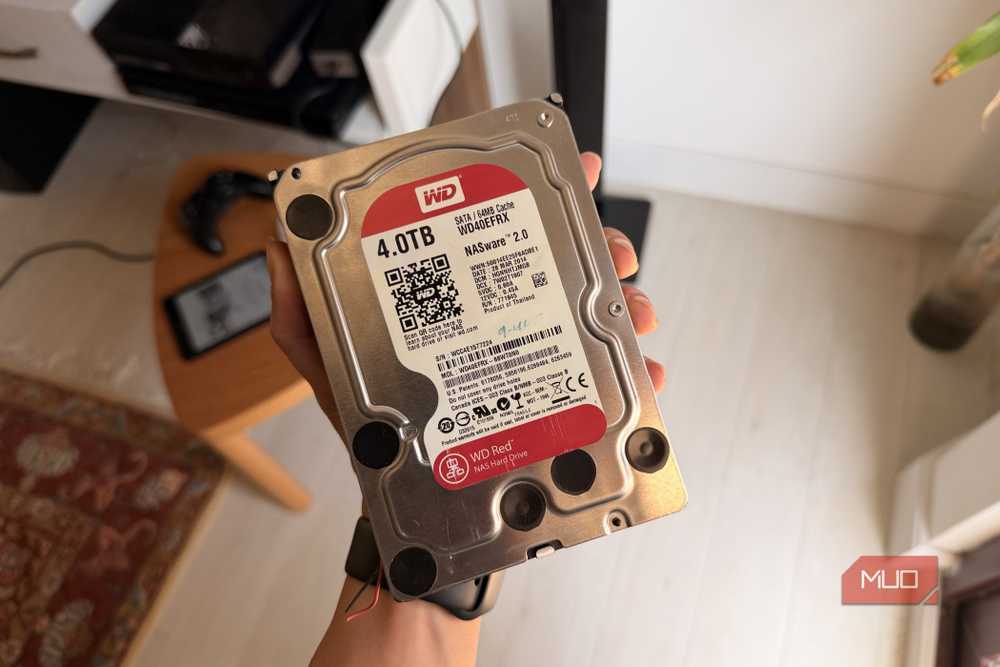
Cheap storage was my favorite type of dreadful idea. I bought two second-hand WD Red Plus drives for $100 each and put them in RAID 0. It combined their capacity, but gave me zero redundancy if either failed. Why did I do this? I wish I knew.
Two used WD Purple surveillance drives followed at $22 each. One failed, taking 2TB of media with it. That loss amazingly wasn’t the result of the dumb RAID 0 array, but it exposed just how little thought I’d put into backup.
Four drives also meant more bays, power, cooling, and a reason to keep the server running 24/7. The rust kept spinning even when I wasn’t using the media, and by then, the server held more than just files. My Proxmox VMs depended on it too, and as I found out, a failing PSU was all it took to send me back to the e-waste shop again.
A RAID array isn’t really an insurance policy against data loss. Nonetheless, choose a configuration level with mirroring + striping like RAID 10, or parity striping like RAID 5 and 6.
Redundant power supplies
They could handle a failed PSU, but they couldn’t handle a blackout

One summer storm and a lightning strike were all it took to fry my consumer PSU and take a few VMs out with it. Rather than buy another cheapish unit online, I visited my favorite e-waste seller and bought a cheap redundant ATX power supply.
Its two modules made sense for the exact problem I’d just had. If one failed, the other could immediately take over and keep the server running while I replaced it.
They couldn’t help, though, if the storm knocked out power to both. So, of course, I ended up buying a rack-mounted APC uninterruptible power supply (UPS) to keep the power flowing to my gear in the event of a blackout. This was also second-hand, but unlike the PC components I had bought, it wasn’t cheap.
Each of the two PSU modules was rated 500W, but that didn’t mean the server drew 1,000W. The second module was there to take over if the first failed. It was, however, yet another purchase required to keep what could no longer be considered a “bargain build” going.
And even when the power stayed on, the high-RPM fans I had purchased cheap online made sure I couldn’t forget the server was there.
Server fans
Buying loud second-hand high-RPM fans was the last straw

The motherboard had come with a single exhaust fan at the back. Where I live, an average summer day can see temperatures hit 104°F, meaning PC overheating with a single fan was an inevitability rather than a risk.
Naturally, buying used high-RPM server fans seemed like the most sensible purchase yet. They cost less than ordinary gaming PC fans, and as I was about to find out, there’s a reason why.
When starting the server for the first time with its array of 80mm 10,000 RPM fans, it sounded and felt like standing behind an Airbus A380 taking off. This obviously shattered the peace of an otherwise quiet household and led to me trying to swap out the mini-jet engines for slower, quieter fans.
Unfortunately, the Intel server board wanted none of it, and beeped loudly in protest and refused to even POST. I can’t say for sure what its issue with the fans was, but the result was clear. I’d paid twice for cooling and still couldn’t make the server quiet enough for the house.
It was at this point that my partner demanded the entire setup be moved to the garage. It was also when I had decided enough was enough.
The bargain finally stopped looking cheap
I kept the useful lessons and built a homelab I could live with

Eventually, the noise got the better of me. As did the power bills and buying another cheap part to justify the last one. The Intel server board inevitably failed, though I never confirmed whether its VRM or BMC was to blame.
I kept the Xeon CPU, moved it to a compatible consumer LGA 1150 board, ditched the ECC RAM, and put the rebuild in a case with quiet fans.
My homelab now centers on one Proxmox PC, with NUCs and SBCs once again handling the lighter file-server and router jobs. The old gear had taught me plenty, but now I just buy it for the work I’ll actually do and the hours the machine needs to stay powered up.
In the end, I put all the enterprise-grade PC parts back on the local online marketplace and sold them to someone else. I just hope their electricity bill is cheaper than mine.