I’m in no way, shape, or form a gamer. Other than the occasional round of Fortnite (where I’ll reliably come dead last), my gaming career peaks somewhere around Roblox and Subway Surfers. I’ve never once been tempted by a gaming laptop or a curved RGB monitor. Despite all of that, somehow the most useful browser feature I’ve found all year is buried inside a browser made for people who take gaming very seriously.
Browser tabs are RAM hogs
Every tab is a tiny tax on your RAM
If you’re reading this article, you’ve likely put together that I’m a journalist. Journalism, at least the way I do it, runs on a lot of tabs. A spec sheet here, a launch blog there, help center articles, comparison reviews, Reddit and X threads, Asana tabs, and so on. Then there’s everything that has nothing to do with the actual work: Spotify, my email, and even Netflix a lot of times! Given I’m a massive multitasker, I’m often working on more than one article simultaneously (along with some college work and the occasional retail therapy), meaning the number of tabs I have open at any given moment can balloon fast.
If you’re wondering “how does your laptop not burst into flames,” well, that’s exactly the problem. Browser tabs are far more expensive than they look. To keep things stable and secure, modern browsers treat every single tab as its own isolated process, which comes at a steep cost to your system resources. A completely blank tab already eats somewhere between 30 and 50MB of memory just to spin up its base renderer. Navigate to an actual webpage and that number climbs fast, with a typical background tab often using more than 100MB each, depending on how heavy the media and scripts underneath are.
Stack up enough of them and a browser can comfortably swallow four to six gigabytes of RAM. While simple articles don’t demand much, the media-heavy pages are the real memory-consumers here. As someone with a MacBook Air with just 8GB of RAM, my poor machine and my chaotic tab-hoarding habit don’t exactly get along. I’ve gotten the “Your system has run out of application memory” warning far too many times, and I’ve tried just about every workaround to deal with this. I’ve also tried practically every browser there is, and the only feature that has actually helped is Opera GX’s RAM Limiter.
Opera GX’s RAM Limiter does exactly what it promises
Turns out the fix was a slider all along
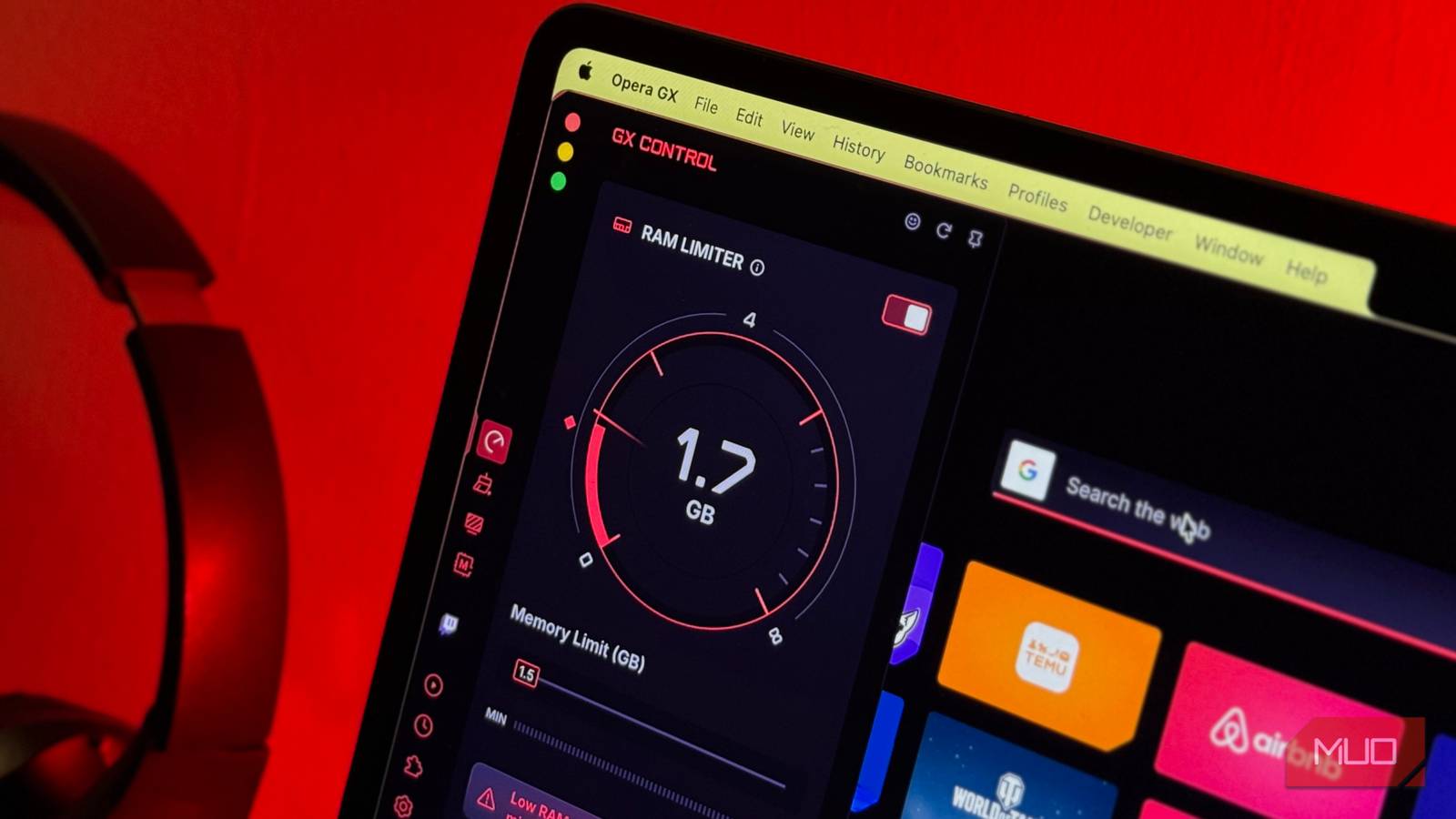
Opera GX is, in its own words, the first browser built for gamers. In the middle of Twitch and Discord integrations, custom gaming themes, and keyboard sound effects, there’s a tool called GX Control. GX Control acts like a bouncer for your browser, watching how much memory, CPU, and network bandwidth Opera GX is using and letting you cap each one. You find it by clicking the little speedometer icon in the sidebar, and the RAM Limiter sits right at the top of the panel.
Once you flip the toggle on, a slider appears that lets you set exactly how much memory the browser is allowed to use. You then set a number, and Opera GX does its best to stay under it with a live readout of your current usage right here on the dial so you can watch it work in real time.
Now, this feature doesn’t commandeer your operating system or do some magic. The limiter works by reining in Opera GX’s own behavior. As you approach your cap, it unloads inactive tabs from memory, slows background scripts, and defers non-urgent tasks. There’s also a Hard Limit toggle sitting beneath the slider for anyone who wants a genuine ceiling the browser will never cross, at the cost of tabs reloading more aggressively when you click back into them.
I put it through its paces on the exact chaotic setup I described earlier, with dozens of tabs open, 17 of them YouTube, and a pile of travel sites left over from planning a trip. With the limiter set, Opera GX started snoozing the tabs I wasn’t actively using, so that when I clicked over to a dormant Booking.com or Klook tab, I’d be greeted by a small “This tab was snoozed by RAM limiter” banner as the page reloaded.

The YouTube tabs were their own kind of chaos, since a lot of them were genuinely playing at the same time, at different points in different videos, and every so often one would abruptly pause as the limiter snoozed its tab, while the video I was actively watching carried on untouched in picture-in-picture.
The real test, though, was in the numbers rather than the banners. I had the cap set to 4GB, and when I opened Activity Monitor and added up every Opera GX process, the browser was holding steady at roughly 3.4 to 3.8GB.

This was under the ceiling I’d set, exactly as promised! It stayed within the limit throughout (even when I opened new tabs), while snoozing idle tabs as needed to keep itself in check. Seeing the total sit reliably below my cap, instead of creeping upward the way an unmanaged browser normally would as I opened new tabs without closing any myself, was oddly satisfying!
The tradeoffs are fairly obvious
Of course, this feature isn’t without its downsides. Every tab it snoozes automatically has to reload once you click back into it, which can get mildly annoying if you’re bouncing between tabs a lot. There’s also a limit to how low you can reasonably go, since Opera GX needs around 1.5 GB just to run, and anything below that will get you a warning that your browsing speed might suffer.
It’s a guardrail rather than a replacement for occasionally closing a few of those 17 YouTube tabs myself, but when I keep it at a reasonable number, like the 2 to 2.5GB I’ve settled on with Hard Limit turned off, it’s the one feature that has consistently kept my MacBook Air away from that “out of application memory” warning! I really hope other browsers get similar features too, because this feature doesn’t deserve to be locked away inside a browser advertised for gamers!
Chrome and Edge already have their own versions of this in Memory Saver and Sleeping Tabs, but they tend to wait until your system is already struggling before they kick in, and they give you very little say over how much memory the browser can use or when it decides to intervene. Opera GX just hands you the slider and lets you set the number yourself, and that small amount of control is exactly what I want from every browser I use.