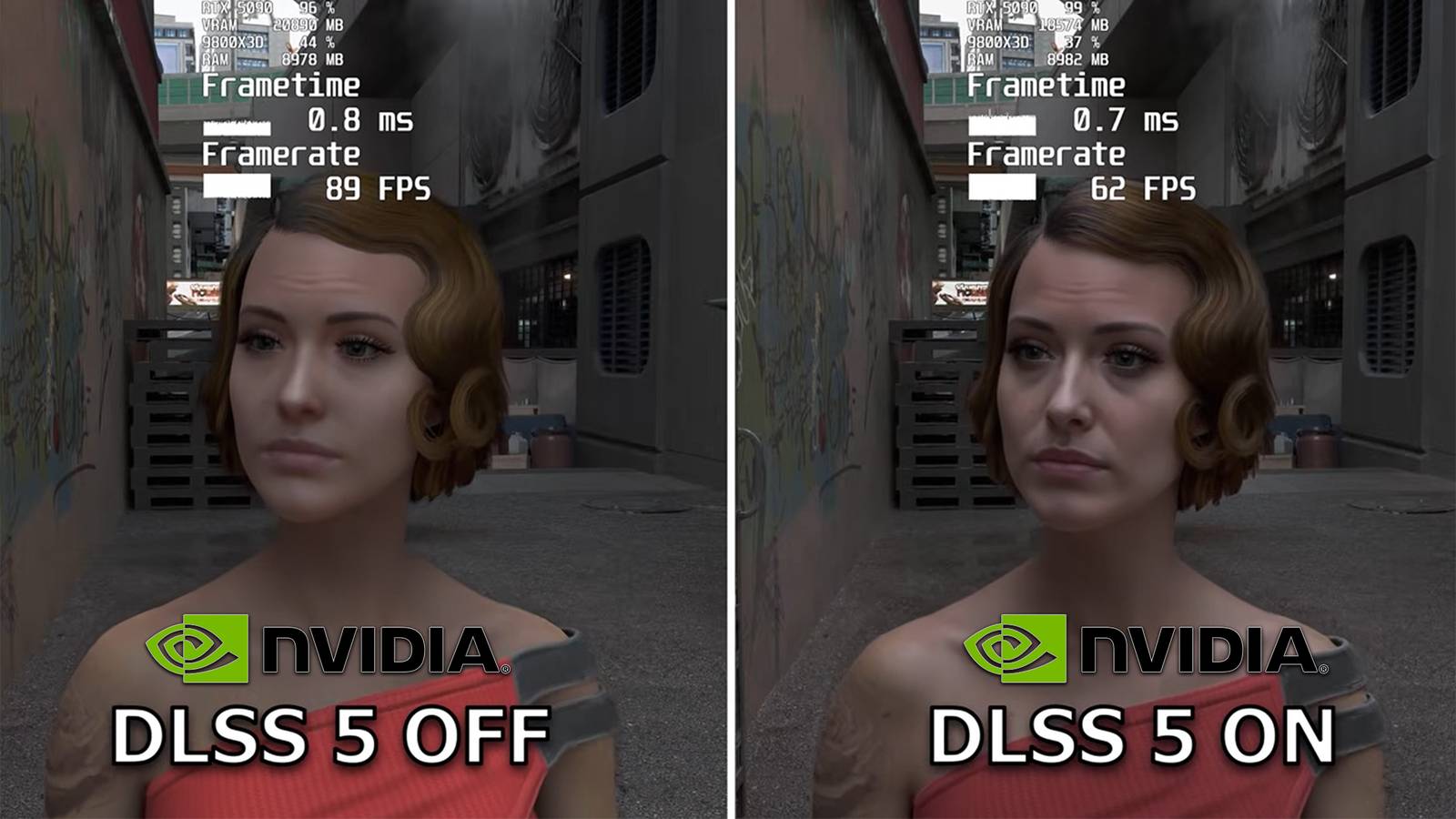
Nvidia’s unreleased DLSS 5 is already circulating in the PC modding scene, and you can try its neural-rendering effects on just about any Nvidia RTX GPU without waiting for the official rollout. A free, open-source, community-made utility that uses RenoDX and ReShade to install the necessary files, back up a game’s original DLSS components, and restore them if anything breaks.
I’ve tested the idea on an HP Omen Transcend 14 with an RTX 4060, but this is not a conventional DLSS update. It’s an unofficial, experimental runtime with inconsistent results, a steep performance penalty, and no guarantee that it will work in every game.
How Nvidia DLSS 5 leaked through NBA 2K27
The leaked DLSSNR runtime is what makes this possible

DLSS 5 wasn’t supposed to be public yet. Nvidia had teased the technology as part of its neural-rendering plans, but an early-access PC build of NBA 2K27 reportedly included a new library called nvngx_dlssnr.dll. The NR appears to mean neural rendering, and the file was identified as an Nvidia DLSSNR runtime rather than the normal DLSS Super Resolution library used by current games. Researcher Renan Maniero reportedly spotted the DLL in the game’s files, after which the RenoDX modding community began experimenting with it.
RenoDX is what made those experiments practical. It is a DirectX-game modding framework built around ReShade’s add-on system, allowing modders to inject buffers, shaders, overlays, texture changes, and swapchain upgrades without patching a game executable directly. That gave the community a relatively flexible way to load and test the leaked Nvidia library in unrelated games.

The first well-known example was Control, where modders got neural rendering working on character models. Other tests followed in Cyberpunk 2077, Skyrim, Final Fantasy VII Rebirth, Red Dead Redemption 2, and Grand Theft Auto V. None of those games officially support DLSS 5. This is a leaked, apparently unfinished runtime being adapted to games that were never designed to expose its settings or rendering features.
How to install DLSS 5 with DLSS5-Swapper
Install the runtime, select your game, and enable DLSS 5
Running the DLSS5-Swapper is also rather simple:
- Head to the DLSS5-Swapper GitHub releases page and download either the Windows installer or the portable exe.
- Run it, and click through the Windows SmartScreen warning that appears — this shows up because the app isn’t code-signed.
- Let the app auto-scan your library, or use Add Folder to point it at a game’s install directory manually if a title doesn’t show up automatically.
- Pick a supported title and hit the Install DLSS 5 button. The app pulls down the neural rendering files and swaps in the leaked DLL where the older DLSS library used to sit.
- Launch the game, press Home to open the ReShade overlay, and check the Add-ons tab — you should see DLSS 5 Neural Rendering listed as active.
That’s the whole process. No manual DLL hunting, no fiddling with injection methods by hand — the app handles the file swap, and the Restore function is right there if you want your game back to its original state in seconds.
Nvidia DLSS 5 can cut RTX performance dramatically
71 fps in Control becomes 35 with neural rendering on

This is not a finished feature, let alone an official one, meaning there are some caveats you need to be clear about. The leaked runtime is an unoptimized, experimental build that Nvidia never intended anyone outside its own testing to touch, so every result you get is more of a preview rather than a benchmark of the real thing.
The first casualty is performance. Testers running an RTX 5070 Ti in Control at 4K saw frame rates drop from roughly 71 fps to about 35 fps with neural rendering switched on, essentially cutting performance in half. The weaker your card is compared to Nvidia’s current lineup, the more brutal the performance hit will be.
HDR support is also broken in the current build, so don’t expect your HDR panel to behave properly with this enabled. The effect itself is inconsistent too; so far it mostly reworks character models and skin detail rather than the whole scene, and the result ends up looking more like AI slop rather than a genuine upgrade.
Last but not least, it also doesn’t work with every game out of the box. Titles need to expose the right vector data for DLSS 5 to read, which is why Vulkan and OpenGL games need extra workarounds through tools like DLSS5-Feeder before they’ll cooperate.
DLSS5-Swapper handles the Nvidia DLSS 5 installation
RenoDX and ReShade do the heavy lifting underneath

Manual installation is possible, but it involves tracking down the correct DLLs, setting up ReShade, selecting the right DirectX injection method, installing RenoDX components, and preserving the original game files. DLSS5-Swapper turns much of that into a simple Windows app.
The tool scans common Steam, Epic Games Store, and GOG libraries, although you can point it to a game folder yourself if automatic detection fails. For games that already support DLSS, select the title and use the DLSS 5 install option. The app backs up relevant files, deploys the needed components, and includes a Restore function for undoing the change later. Newer versions also offer an in-game overlay and broader support for alternative graphics APIs and emulators.Games without native DLSS need a more experimental route called DLSS5-Feeder. The neural-rendering add-on needs DLSS calls, motion vectors, and frame data. A game with no DLSS support does not generate those calls, so DLSS5-Feeder attempts to supply them by using information accessible through ReShade, including the rendered frame, depth buffer, and estimated motion vectors. It is an inventive workaround, but it is less reliable than using a title that already supports DLSS.
This leaked Nvidia DLSS 5 build is still highly experimental
Performance, HDR, and game support are all unfinished
Given the performance hit and HDR hurdles, this is more a curiosity project for people who like tinkering, not something that’ll improve your daily gaming sessions. If your machine already struggles at higher settings, expect the character-model neural rendering to be more of a novelty than an upgrade until Nvidia ships an actual optimized version.
Since Nvidia has not confirmed NBA 2K27 as an official DLSS 5 title and hasn’t announced a general release date at the time of writing, none of what you’ll see reflects the final performance or visual quality. Still, if you’re curious what the fuss is about, DLSS5-Swapper genuinely does make trying it painless, and you can always restore your game to its original DLSS files if things go sideways.