
I’ve tried foldables from every major brand, and the best ones encourage me to use the large, folding displays to their fullest potential. Hardware does play a factor, as phones like the Samsung Galaxy Z Fold 8 have a quick-opening hinge to make getting to the main display easier. However, it really comes down to software. Foldable phones with incredible optimization and powerful multitasking tools will always win me over, even if others have better hardware. So, I used the Google Pixel 11 Pro Fold, Galaxy Z Fold 8, and Motorola Razr Fold to see which foldable offers the best multitasking software.
Going into the test, I surely thought it’d be a two-horse race between Google and Samsung. After all, Motorola’s My UX skin is quite similar to Google’s Pixel UI, and I expected the Razr Fold and the Pixel 11 Pro Fold to perform similarly as a result. Samsung is known for its robust multitasking features, and it’s been making foldables longer than Google and Motorola, so I thought it’d have a clear edge. Instead, one foldable’s multitasking and productivity suite impressed me in a way I didn’t expect.
Google’s multitasking features are too basic
Split-screen views are fine, but app bubbles aren’t good enough
Google Pixel phones are beloved for their clean and intuitive software, and I get it. Using the base Pixel 11, or even the Pixel 11 Pro Fold cover screen, reveals that Pixel UI is the simplest mobile operating system out there. The experience isn’t nearly as good after opening the Pixel 11 Pro Fold’s 8-inch folding display. You get the same multitasking features available on every other Pixel phone, plus the Taskbar. While the Taskbar does make it easier to create split-screen views and access app bubbles, it’s not enough to make the Pixel 11 Pro Fold’s multitasking suite competitive with the likes of Samsung and Motorola.
To be fair, the multitasking features built into Android 17 are neat, and the Pixel 11 Pro Fold gets them all. My preferred way to multitask on the Pixel 11 Pro Fold is by using a basic 50:50 split-screen view or setting up a 90:10 arrangement. The latter is an amazing addition, first introduced with Android 17. It allows you to keep an app opened that nearly uses the entire screen, while keeping a sliver of a secondary app visible in minimized form. Tap the edge of that minimized app, and the two apps switch places. It’s great for when you need to quickly move between two apps, but want to enjoy both of them in full-screen mode.
I’ve raved about how Android 17’s app bubbles supercharge multitasking on Pixel foldables, and that’s still true. However, this is compared to previous Pixel UI skins, not compared My UX or One UI. App bubbles are still surprisingly limited compared to Samsung’s pop-up views or Motorola’s floating windows.
You can’t resize or separate individual app bubbles indepentently of the group. Closing an app bubble shuts it down completely, so if a song or video was playing in the background, it comes to a halt. App bubbles are a step in the right direction, and I like how they fit nicely into the Taskbar on Pixel foldables, but Google still has work to do. Unless you’re content with the same multitasking tools you’d get on a slab phone, the Pixel 11 Pro Fold’s productivity features will let you down.
Samsung nails pop-up views, but it’s not enough
One UI still doesn’t make multitasking as simple as it should be

I’ve already hinted that Samsung’s One UI offers better support for pop-up views than Google’s Pixel UI. Using the Galaxy Z Fold 8, you can open three apps in a split-screen configuration, and that’s before getting to the five more you can open in pop-up views. That’s a grand maximum of eight apps open at one — not that you’d ever want to use that many Android apps simultaneously. On paper, the Pixel 11 Pro Fold stacks up similarly, since you can use five app bubbles at a time in addition to your split-screen apps.
In real-world usage, Samsung’s pop-up views trounce app bubbles. None of the limitations of Android 17’s app bubbles apply to One UI 9’s pop-up views, which have been around for a lot longer. Pop-up views on the Galaxy Z Fold 8 aren’t confined to a single stack. I can move and resize them indepentently of each other, scattering the floating windows across my screen as I see fit. Once a pop-up view is active, I can tap the window’s grab handle to expand it, minimize it, or turn it into a split-screen view. Or, I can close the pop-up view and keep the app running in the background.
Samsung allows you to open more apps at once than Google, and it also gives you full control of where to put them. By far, floating windows are the best part of multitasking on a Galaxy Z Fold 8. I can use the same 90:10 split-screen views as the Pixel 11 Pro Fold, but I also get up to five more pop-up views that can be resized, moved, expanded, or minimized with a tap or two. Despite how good multitasking on the Galaxy Z Fold 8 is, it’s not the best foldable for productivity. That’s because Samsung doesn’t push you to use these features at all — you can use your foldable for years without ever running into them.
Motorola offers the best of both worlds
The power of Samsung, with the simplicity of Google
Immediately after trying the Motorola Razr Fold, I fell in love with the phone’s multitasking software. The Razr Fold debuted before the Pixel 11 Pro Fold and the Galaxy Z Fold 8, and I was curious to see if Google or Samsung would rise to the occasion. Alas, Motorola’s multitasking software is still the best of the three. It’s the one that gives you the nudge to try the productivity features on your foldable. Open the app switcher, and you’ll see a grid of recently used apps with simple buttons for activating split-screen views or launching freeform floating windows.
Like Google and Samsung foldables, you can also create split-screen arrangements and open floating windows straight from the Taskbar. Floating windows on the Razr Fold work the same as they do on the Galaxy Z Fold 8 — you can resize them and move them wherever you’d like. Better yet, the Razr Fold keeps a three-button menu at the top of each app when the folding display is opened. From here, you can place an app into a split-screen pair or transform it into a floating window. This is all without having to open the Taskbar or app switcher.
Best of all, Motorola will display a small pop-up bubble when My UX notices you’re switching between two apps frequently. Say I’m looking at something in Chrome and checking Gmail at the same time, the Razr Fold will show an Open in split screen mode button at the top of the screen. I can tap it to immediately jump into the app pair shown as a 50:50 split. It’s more convenient than manually building split-screen views yourself, and it reminds casual users that may not be familiar with Android multitasking to use these features. Like the Pixel 11 Pro Fold, clicking a link in an app automatically opens it in your default browser in a separate split-screen window for convenience.
It’s the polish of Google software with the power of Samsung software, plus the added Motorola convenience on top. Combined, it makes the Razr Fold the best foldable for multitasking, and it’s not even close.
-

- Battery
-
4,800 mAh silicon-carbon
- Weight
-
201g
- IP Rating
-
IP48
- Brand
-
Samsung
- Processor
-
Qualcomm Snapdragon Elite Gen 5 for Galaxy
- Cover screen
-
5.5-inch
The Samsung Galaxy Z Fold 8 is an ultra-slim premium foldable smartphone featuring a 5.5-inch passport-style cover display and a 7.6-inch main internal screen. Measuring just 4.5mm thick when unfolded, it features a 50MP dual-camera system, a Snapdragon 8 Elite processor, and an IP48 durability rating.
-

- Battery
-
4750 mAh
- Weight
-
239g
- IP Rating
-
IP68
- Brand
-
Google
- SoC
-
Google Tensor G6
- RAM
-
16GB
The Google Pixel 11 Pro Fold is a folding phone powered by the Tensor G6 processor, featuring a large 8-inch main screen and a capable 6.5-inch cover screen. It sports a reimagined design that’s both thinner and lighter than its predecessor, complete with a glowing HiLight orb on the back. The Pixel 11 Pro Fold is still unique for its IP68 durability and magnetic Qi2 support.
-
- Battery
-
6,000mAh silicon-carbon
- Weight
-
243g
- IP Rating
-
IP48/IP49
- SoC
-
Qualcomm Snapdragon 8 Gen 5
- RAM
-
16GB
- Storage
-
512GB
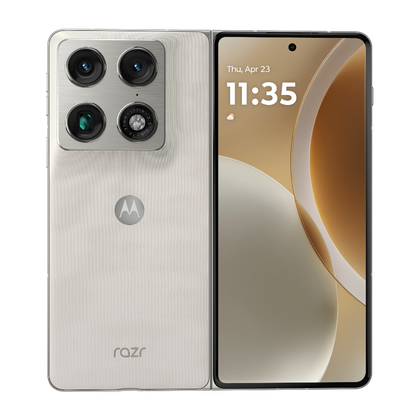
The Motorola Razr Fold is a formidable challenger to Google and Samsung foldables in the U.S., complete with a 6,000mAh silicon-carbon battery and stylus support on both of its screens. It packs slick Pantone colorways and an 8.1-inch foldable OLED display. Plus, it can charge at a whopping 80W over a cable and at 50W wirelessly.


