
Samsung’s Phone app can tell you a call is spam, but that warning won’t stop the phone from ringing. It checks each incoming number against a database of known scam and nuisance callers, and when something matches, a Suspected spam label appears on the call screen. On my phone, that label was nearly all it did, and I still had to stop and decide what to do with each of those calls.
After declining calls like that several times a week, I went through the Phone app’s settings to see whether Samsung offered anything stronger. It does, though one option covers far less than its name suggests.
Flagged spam calls never ring now
Reject nuisance calls automatically
The first setting I opened was Caller ID and spam protection, the feature behind that warning. I’d turned it on long ago and never looked past the main toggle, so I’d missed the switch sitting right below it. Block spam and scam calls had been off the whole time. It tells the phone to reject any number it recognizes as spam, so the call never reaches the screen.
Turning it on gives you two options. Only block high-risk scam calls stops the numbers most likely to be fraud but still lets telemarketers and robocalls ring through. Block all spam and scam calls catches anything the database has flagged. I went with the second one, because sales calls were what interrupted me most. That also means a legitimate business whose number has picked up spam reports can get blocked with everything else, though so far, it hasn’t cost me the call I needed.
To turn this on, open the Phone app, tap the three-dot menu, and select Settings. From there, go to Caller ID and spam protection and switch on the main toggle if it’s still off (some carrier models may not show this option). Then enable Block spam and scam calls and pick Block all spam and scam calls. If that feels too aggressive, the high-risk option lets more calls through while still stopping outright phone scams.
Hidden numbers no longer reach me
Block private numbers, not contacts
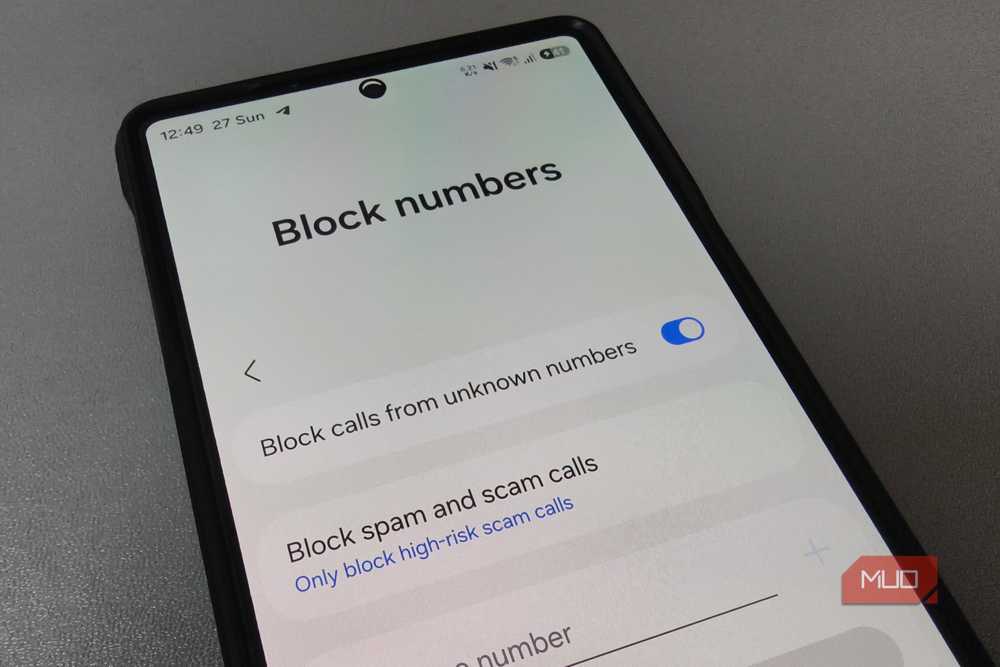
The spam filter has one blind spot, because it can only judge a number it can actually see. Calls that show up as Private number or Restricted carry nothing to check, so they rang through like any other call. Samsung handles these with the first toggle on the Block numbers page, Block calls from unknown numbers. I’d left it off for years, because the name made it sound like my phone would reject anyone not saved in my contacts. If that were true, a call from a delivery driver or a mechanic would never reach me.
That isn’t what unknown means on Android. On an iPhone, it does, because Silence Unknown Callers sends calls from numbers outside your contacts and recent calls straight to voicemail. Android uses the word far more narrowly, for calls that arrive with no caller ID at all, either because the caller chose to hide it or because the network couldn’t pass it along. A number that shows up on screen, saved or not, still rings like before.
So it’s one of the easiest settings to leave on, since hardly anyone I need to hear from hides their number. The main exceptions are doctors’ offices and clinics that call from withheld lines, along with the occasional international call that loses its caller ID on the way. You’ll find Block numbers in the same Phone settings menu as the spam filter, sitting just above it.
Unknown callers talk to AI first
Let an assistant screen callers
Even with both blocking settings on, spam from new numbers still gets through, because nobody has flagged them yet. They often show up with local area codes and look like normal calls, so the screen alone tells me very little. Now, I let Samsung pick up first. With Call screening set to Unknown callers, an AI assistant answers, announces it’s recording the call, and asks who’s calling and why. This time, unknown really does mean anyone outside my contacts who hasn’t called me before.
Whatever the caller says shows up as a live transcript, with a one-line summary at the top. A delivery driver explains who they are, while a robocall just plays its recorded pitch. Either way, I can read it and decide without saying a word. If I want to know more, Text call lets me type my own question, and the assistant reads it out loud.
The assistant only asks questions and won’t hang up on a sales pitch by itself, so ending those calls is still up to me. The conversation goes to Samsung’s servers for processing, though the company states it keeps none of it. On phones with Call screening, the old Bixby Text call button is gone, since screening has taken its place. You’ll find it at the top of Phone settings, as long as your phone runs One UI 8.5 or later.
Scam detection catches the rest
My phone rings a lot less now, and when it does, it’s usually someone I actually want to hear from. The few real calls I miss aren’t lost either, since Direct voicemail answers them after a delay I set. Google’s Scam Detection, once exclusive to Pixel phones, now reaches more Galaxy phones with One UI 9 and warns you mid-call if a conversation starts to sound like a scam. The update is already rolling out to the Galaxy S26 series, with other Galaxy phones to follow.


8.5/10
- SoC
-
Snapdragon 8 Elite Gen 5
- Display
-
6.9-inch Dynamic Super AMOLED 2X
- RAM
-
12 or 16 GB
- Storage
-
256GB, 512GB, or 1TB