
The 3.5mm headphone jack built into a laptop or desktop computer is probably good enough for most Windows 11 users. After we’ve upgraded the hardware and tweaked the software, the biggest limiting factor in perceived sound quality is actually our own hearing. That said, not every inbuilt digital-to-analog converter (DAC) or 3.5mm headphone jack is of the same quality. There’s a chance the DAC and headphone jack on your PC are good enough, and there’s a chance they aren’t. The one way to guarantee you’re getting the best audio from your Windows 11 machine is to buy a cheap USB-C DAC.
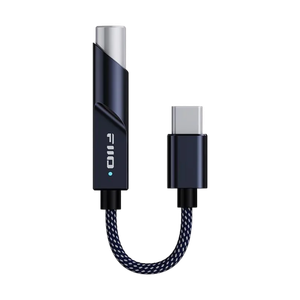
Great sound quality doesn’t have to cost you a fortune. You can opt for better gear, such as the $140 Fiio K11 or the premium $550 Fiio K15, which are both relatively fancy desktop amplifiers. However, the sweet spot for the average music listener is an ultra-budget USB-C DAC and headphone amplifier, like the Fiio KA11. This is a tiny USB-C to 3.5mm headphone jack dongle that only costs $33, and it packs the ability to play high-resolution lossless music files and drive high-impedance headphones.
Sound quality is only part of the equation
Yes, a cheap DAC unlocks high-fidelity audio playback

By default, the 3.5mm headphone jack on your laptop or desktop tower probably can’t play the highest-resolution lossless music files. Opening up the Sound Properties menu in Windows 11 by clicking the speaker icon in the Taskbar and selecting Sound settings → More sound settings reveals the sample rate and bit depth used by your headphone jack. You’ll most likely see a default bit depth and sample rate of either 16-bit, 44.1kHz or 16-bit, 48kHz. These are known as at or above CD quality.
To use a higher sample rate or bit depth, you must manually change the setting in the Sound Properties menu. The highest possible quality setting available will vary based on your hardware. You might see a maximum bit depth and sample rate of 24-bit, 192kHz available.
In that case, you might not need a separate USB-C DAC. The 24-bit, 192kHz quality supported by some Windows PCs and 3.5mm outputs matches that of common high-resolution audio files and music streaming services. However, you will want to raise your PC’s default settings to 24-bit, 192kHz manually if you plan to play hi-res lossless music. Windows will downsample the audio before it reaches your headphones if you leave the default settings of either 16-bit, 44.1kHz or 16-bit, 48kHz unchanged, resulting in quality loss.
PC manufacturers don’t spend a ton of time ensuring the 3.5mm headphone jack meets audiophile standards.
A cheap USB-C DAC is more capable than the 3.5mm headphone jack on your PC, technically speaking. Take the Fiio KA11 I use with all my USB-C devices, for example. The dongle can play 32-bit, 384kHz audio, likely beating your PC’s inbuilt headphone jack. This advantage looks great on a spec sheet, but as I’ve explained before, human ears can’t hear the extra audio data. Sound recordings aren’t mastered in 32-bit, 384kHz audio anyway, so this USB-C DAC feature offers little practical benefit.
It’s everything else a USB-C DAC does well that makes it an excellent alternative to your PC’s inbuilt solution. PC manufacturers don’t spend a ton of time ensuring the 3.5mm headphone jack meets audiophile standards. For audio accessory makers, it’s all they care about. That’s why you see accessories like the Fiio KA11 offer a total harmonic distortion plus noise (THD+N) value of less than 0.0006%. This tells you the DAC offers clean, high-fidelity sound reproduction. It also has a signal-to-noise ratio (SNR) of 125dB, meaning the signal is 125dB stronger than the noise.
These are the sound quality upgrades offered by a USB-C DAC you’ll truly notice — not the 32-bit, 384kHz audio that won’t matter off the spec sheet.
A USB-C DAC can handle power-hungry headphones
Your PC or laptop’s 3.5mm jack isn’t enough for high-impedance cans
A USB-C DAC with great THD+N and SNR values will sound better than an inbuilt 3.5mm headphone jack with worse values and more interference, especially to critical listeners. However, my favorite USB-C DAC feature doesn’t have to do with sound quality. It’s all about power output, because a 3.5mm jack’s power output determines what kind of headphones or in-ear monitors it can drive. If you have a pair of high-impedance or low-sensitivity headphones plugged into a weak audio jack, they won’t sound right. You could experience low volume or poor sound quality, and it’s all because the cans aren’t getting enough power.
The 3.5mm headphone jack on Windows PCs isn’t standardized, so different models might have different output power capabilities. The average Windows laptop typically has a 3.5mm output power between 1V and 2V RMS (Root Mean Square), but this can vary. It’s a different situation for many Macs released after 2021, which have 3.5mm jacks that can deliver up to 3V RMS while driving high-impedance headphones up to 1,000 ohms. Those with a set of high-impedance or low-sensitivity headphones, such as my Sennheiser HD 600’s, might need a USB-C DAC if their PC’s headphone jack isn’t up to snuff.
Despite the Fiio KA11’s small size, it can deliver up to 245mW of power under a 16-ohm load and up to 200mW of power under a 32-ohm load. For higher-impedance headphones, the USB-C DAC can deliver more power than a laptop or desktop’s built-in audio jack. This is why I use the Fiio KA11 to drive my power-hungry headphones. It’s a capable USB-C DAC with enough amplification power to drive most headphones. Until you get near the 600-ohm threshold, you don’t need to worry about splurging on a larger and more expensive desktop DAC/amplifier.
Unplug the DAC, and use it with any USB-C device
This $33 accessory can do more than improve your PC’s audio

I’ve tested desktop DACs at various price points, and have even shelled out for a few of them with my own cash. I bought the $33 Fiio KA11 and the $140 Fiio K11 for my personal setup, and there’s no question which USB DAC gets more use. It’s the ultra-budget Fiio KA11. When I’m not using it at my desk, it plugs into my laptop or tablet’s USB-C port. While traveling, it adds a 3.5mm headphone jack to my iPhone and Android phones. It brings better sound to any device with a USB-C port, and that’s incredible flexibility for a cheap audio accessory.
You don’t need to spend a fortune to get higher-quality audio out of your Windows PC, but an affordable USB-C dongle is certainly worth your while.
- Type
-
32-bit/384KHz
- DAC
-
THD+N:
- Amplifier
-
245 Milliwatts
- Connectivity
-
USB-C
The Fiio KA11 is a USB-C dongle digital-to-analog converter (DAC) that brings up to 32-bit, 384kHz sound to any Type-C device, including phones, tablets, and PCs.