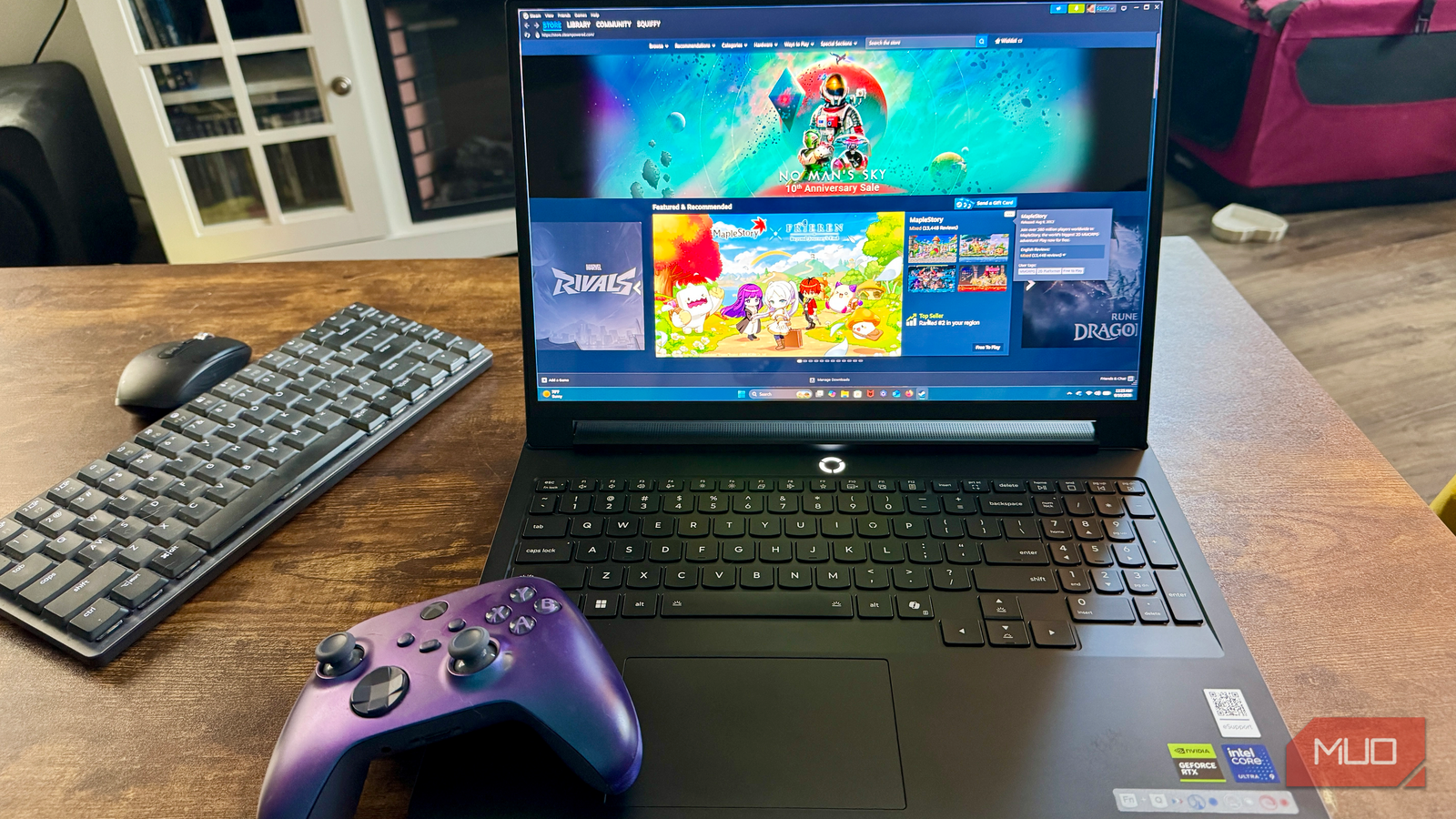
I’ve spent a week gaming, benchmarking, and working with Lenovo’s new Legion Pro 7i, and it’s one of the most capable laptops I’ve tested this year. The RTX 5080 inside barely breaks a sweat, the OLED panel is stunning, and the build quality feels like it costs every bit as much as it does.
I’ve spent months putting Lenovo’s laptops through their paces, from the Yoga AIO to the Yoga 7a 2-in-1, and I’ve put plenty of other brands through the same paces too, from the HP EliteBook X Flip G2i to a Dell XPS 13 that kept reminding me of my MacBook Air. Each one makes a different case: value, portability, executive polish, macOS-adjacent design. The Legion Pro 7i is a different animal entirely. This is a flagship gaming machine, and it’s built to compete on raw power first and foremost. Over a week of benchmarks, real games, and daily use, I found a laptop that delivers on that promise, with a couple of things worth knowing about before you go all in.
Lenovo Legion Pro 7i pricing and availability
A flagship gaming laptop with a flagship price
The exact configuration I tested, Core Ultra 9 290HX Plus paired with the RTX 5080, is listed directly on Lenovo.com (model 83F500M0US) at $5,578.99 list, currently discounted to $3,467.49. Every other retailer I checked, Amazon, B&H, Slickdeals, stocks a different, more common configuration with the Core Ultra 9 275HX instead, so shop carefully if the CPU matters to you.
That said, this thing is a genuine beast and deserves a look.

8.5/10
- Operating System
-
Windows 11 Home
- CPU
-
Intel Core Ultra 9 290HX Plus, 24C (8P+16E)/24T, up to 5.5GHz, 36MB Smart Cache
- GPU
-
NVIDIA GeForce RTX 5080 Laptop GPU, 16GB GDDR7, 175W TGP
- RAM
-
32GB (2x16GB CSODIMM DDR5-6400)
- Storage
-
2TB (two M.2 2280 PCIe 5.0×4 NVMe SSDs)
- Battery
-
99.9Wh, Super Rapid Charge
- Display (Size, Resolution)
-
16″ WQXGA (2560×1600)
- Camera
-
5MP, fixed focus, physical E-shutter switch
- Speakers
-
4-speaker system with Nahimic Audio
- Colors
-
Eclipse Black
- Ports
-
2x USB-C (1x Thunderbolt 4, 1x 100W PD), HDMI 2.1, 3x USB-A, RJ45, audio combo jack
- Network
-
Wi-Fi 7 (802.11be) 2×2, BT 5.4, 2.5GbE
- Dimensions
-
14.35 x 10.9 x 0.86–1.05 inches
- Weight
-
5.67 lbs
- Brand
-
Lenovo
- Model
-
Legion Pro 7i 10 Gen
- Finish
-
CNC aluminum, anodized
- Keyboard
-
TrueStrike, 1.6mm travel, 0.3mm dish, per-key RGB, 100% anti-ghosting, swappable WASD keycaps
- Display type
-
OLED, 240Hz, Dolby Vision, NVIDIA G-Sync, Advanced Optimus
- Box contents
-
Adapter brick, laptop, power cord
Lenovo Legion Pro 7i form factor, ports, and battery life
A hefty, well-connected machine that doesn’t skimp on ports
The Lenovo Legion Pro 7i balances a gamer-style design with impressive connectivity, housed in a CNC all-aluminum chassis in Eclipse Black with hexagonal vents, bottom-panel cutouts, and a customizable RGB “U” light strip along the front lip that can be toggled or turned off if you prefer a subtle look. At 0.86 inches (21.95mm) at its thinnest point and weighing in at 5.67 lbs (2.57kg), it isn’t something you’re casually tossing into a backpack, but that heft accommodates a full suite of connections: Thunderbolt 4, USB-C with 100W Power Delivery, three USB-A ports, HDMI 2.1, 2.5GbE Ethernet, and a webcam E-shutter. Below the screen, the iconic glowing “O” Legion logo sits above the TrueStrike keyboard, which delivers 0.06 inches (1.6mm) of travel, anti-ghosting, and per-key RGB alongside bundled WASD keycaps, resting over a smooth one-piece trackpad and a wear-resistant aluminum palm rest.
Powering this whole setup is a massive 99.9Wh battery, though the demanding hardware drains it quickly. In my real-world testing, I found that light web browsing dropped the charge from full to 12% in just three hours, even on Battery Saver. Fortunately, Super Rapid Charge redeems its mobility, bringing the system from 12% to 65% in 30 minutes and up to 100% in about 85 minutes.
This laptop feels like a futuristic tank. There’s no flex or twist in the lid or the chassis, open or closed, which helps it feel solid and high-performance. It’s easy to open with one hand, and the keyboard feels crisp and responsive. The trackpad is pretty good, but it still suffers from the same issues as other Windows touchpads I’ve used: there’s mistaken clicks until I turn off the tap to click, and static electricity can cause some cursor overshoot. Lenovo could learn from whatever Apple does with its trackpads.
Sights and sounds of the Lenovo Legion Pro 7i
A 240Hz OLED panel with real Pantone calibration

The Legion Pro 7i offers a 16-inch WQXGA (2560×1600) 16:10 OLED display running at 240Hz, supported by Dolby Vision, NVIDIA G-Sync, and Advanced Optimus. Factory X-Rite Pantone color calibration and a DisplayHDR True Black 1000 rating handle color precision and deep black levels, while TÜV Low Blue Light and High Gaming Performance certifications address eye comfort and motion handling. A quick Fn+R hotkey lets you switch the display between 60Hz and 240Hz to save a bit of power when you aren’t gaming. On the audio side, a 4-speaker setup works with Nahimic 3D Audio, giving you access to an equalizer, virtual surround toggles, and basic voice, bass, and treble sliders via the Nahimic utility.
The OLED panel handles motion well in all the games I tried out, and the 240Hz refresh rate is smooth, but the glossy finish meant reflections got distracting in my bright living room. For creative work, the Pantone calibration saves you the hassle of immediate manual tuning, giving you predictable color accuracy right out of the box. As for audio, the four speakers get loud enough to fill a room, but the sound profile remains a little thin on the low end. It works fine for casual video streaming and quick gaming sessions, though if you’re looking for actual depth or impactful bass, you’ll still want a decent pair of headphones.
Lenovo Legion Pro 7i gaming performance
Baldur’s Gate 3 at 101fps native, and the GPU barely broke a sweat

While I used the laptop for basic daily tasks like writing articles, researching on the web, and scrolling through social media, it worked well and never got too hot in either Quiet or Hybrid mode). But this is a gaming laptop, and that’s what I focused on in my testing.
When pushing a native 2560×1600 resolution at max settings with DLSS turned off, the Legion Pro 7i effortlessly churns through demanding titles. In Baldur’s Gate 3 on Ultra settings, the system averaged a smooth 101 fps (ranging between 88 and 117 fps) in demanding areas. What impressed me most was the heat management (on the hybrid mode): despite sitting at a full 100% load, the GPU stayed surprisingly cool at just 58°C while the CPU hovered around a comfortable 76°C. Throwing a heavier, heavily CPU-bound title like Cyberpunk 2077 at it with Ray Tracing Overdrive enabled and on performance mode will likely force the CPU to work significantly harder, but frame rates remained rock-solid.
My own MSI Cyborg gaming laptop sports a 4050, and this 5080 outclasses it in every way. Definitely worth an upgrade if you have the cash.
Lenovo Legion Pro 7i performance and benchmarks

We tested the system using Geekbench 7, Cinebench 2026, CrystalDiskMark 9, and 3DMark Steel Nomad running plugged in.
|
Benchmark suite |
Test profile / metric |
Result |
|
Geekbench 7 |
CPU single-core |
2,885 |
|
CPU multi-core |
23,920 |
|
|
OpenCL GPU |
173,036 |
|
|
Cinebench 2026.1.3 |
Single-thread |
561 pts |
|
Multi-core |
6,818 pts |
|
|
GPU |
77,691 pts |
|
|
CrystalDiskMark |
SEQ1M Q8T1 Read |
12,430.61 MB/s |
|
SEQ1M Q8T1 Write |
13,206.25 MB/s |
|
|
3DMark Steel Nomad |
Default (Hybrid + Balanced) |
3,940 |
|
Max Performance (dGPU + Performance) |
4,883 |
The storage and rendering scores here are borderline ridiculous. Screaming past 12,400 MB/s read and 13,200 MB/s write speeds, the PCIe Gen5 drive roughly doubles every other laptop I’ve tested this year. In Cinebench 2026, its 77,691 GPU score ranked 2nd globally, trailing only Apple’s M3 Ultra.
Lenovo makes it super easy to switch between whisper-quiet mode, balanced performance, and all-out best performance. It even included a little sticker that shows hitting Fn + Q will rotate you through the three modes, with a blue, white, and red color lighting up the O logo above the keyboard.
There’s also a dedicated Legion Space app that you can use to make sure to switch over to dedicated GPU mode (dGPU), which gave me a massive almost 24% performance jump.
The Lenovo Legion Pro 7i is definitely worth the upgrade if you have the cash.
If you aren’t familiar with these options, switching between them is straightforward. To optimize your graphics routing, open the Legion Space app, navigate to the Performance tab, and locate GPU Working Mode. Selecting dGPU bypasses the integrated graphics entirely for maximum frame rates, whereas Hybrid Mode dynamically toggles the dGPU off when on battery to conserve power.
In that same menu, you can toggle the Thermal Mode preset to Performance (or hit Fn + Q to cycle profiles until the power button LED turns red).
Just be warned: unlocking that extra 24% boost comes at a thermal cost. In Performance mode, the chassis got uncomfortably hot to the touch when benchmarking and fan noise ramped up significantly. Unless you’re chasing every last frame in competitive shooters, sticking to the Balanced mode keeps thermals far more manageable for daily play.
You should buy the Lenovo Legion Pro 7i if:
- You want desktop-class gaming performance and blistering PCIe Gen5 storage speeds that easily top 12,000 MB/s.
- You value a rock-solid, all-aluminum chassis with exceptional build quality, zero keyboard flex, and a smooth 240Hz OLED display.
- You prefer a sleek, professional aesthetic with an understated finish and customizable RGB lighting you can easily control or turn off.
You should NOT buy the Lenovo Legion Pro 7i if:
- You expect all-day battery life away from an outlet, as real-world unplugged runtime tops out at around three hours.
- You need a quiet machine under heavy load, since the cooling fans generate significant acoustic noise in higher performance modes.
- You want a lightweight ultraportable to casually toss into a bag without feeling its 5.67-pound weight.
8.5/10
- Operating System
-
Windows 11 Home
- CPU
-
Intel Core Ultra 9 290HX Plus, 24C (8P+16E)/24T, up to 5.5GHz, 36MB Smart Cache
- GPU
-
NVIDIA GeForce RTX 5080 Laptop GPU, 16GB GDDR7, 175W TGP
- RAM
-
32GB (2x16GB CSODIMM DDR5-6400)
The Lenovo Legion Pro 7i is a powerhouse 16-inch gaming laptop featuring a stunning WQXGA OLED display with a blazing 240Hz refresh rate and factory X-Rite Pantone calibration. Powered by a 24-core Intel Core Ultra 9 290HX Plus processor paired with 32GB of DDR5-6400 RAM and an NVIDIA GeForce RTX 5080 Laptop GPU with 16GB of GDDR7 memory, it includes a robust port selection, Thunderbolt 4, a second USB-C with 100W Power Delivery, 2.5GbE Ethernet, and an HDMI 2.1 output. The Eclipse Black aluminum chassis houses a per-key RGB TrueStrike keyboard, a physical E-shutter camera switch, and a 99.9Wh battery with Super Rapid Charge. It’s an unapologetic performance machine that delivers flagship gaming power with zero compromise on display quality or build.