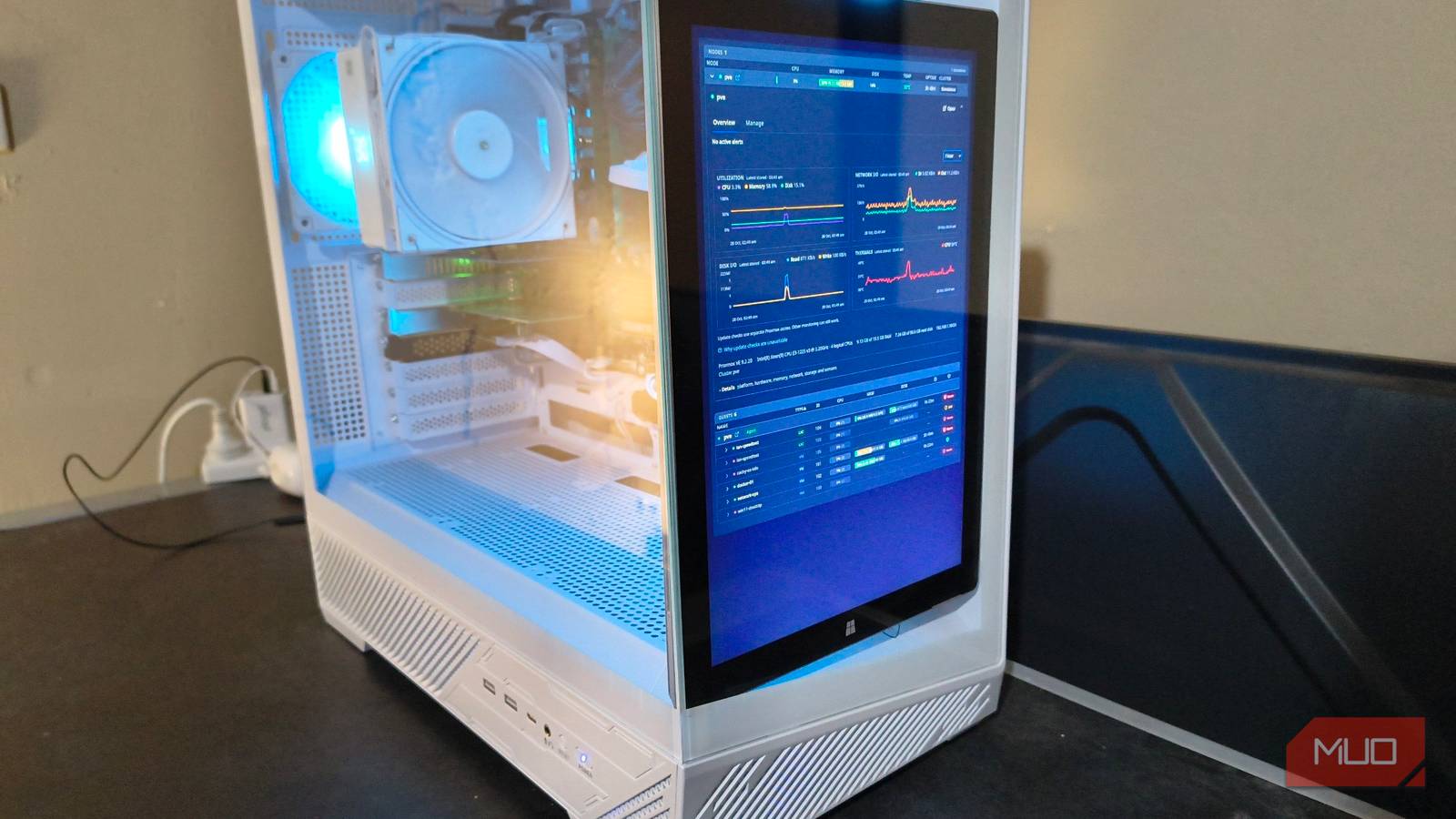
Recently, I dug out an old Microsoft Surface Pro 3 tablet while cleaning out my closet. The keyboard had long given up, but I wasn’t ready to retire the screen along with it.
My Proxmox server sits in my workshop, and it needed a real-time dashboard I could glance at without having to boot up a PC. The old Surface Pro seemed worth a try, since it somehow fit perfectly inside the server case.
Naturally, giving this Microsoft-built Windows tablet a second shot at life started with installing Linux on it.
The Surface no longer needed to be a laptop
Its screen was already perfect for a dedicated display

Since its Type Cover keyboard only had 4 functioning keys, the Surface had become too awkward to use for anything that required typing. The touchscreen, though, still worked perfectly, and a dashboard wasn’t going to require any essay writing.
I also didn’t need the tablet to run the monitoring service itself. I already had a dedicated VM for random Docker containers on Proxmox, so I just installed Pulse there and gave the Surface the easy job of displaying its web interface.
Its Core i5-4300U and 4G GB of RAM were more than enough for the jobs I had in mind:
|
Device |
Its job |
|
Surface Pro 3 |
Run Ultramarine Linux and display the Pulse dashboard in Firefox. |
|
Existing Docker VM |
Host Pulse and retain monitoring history. |
|
Proxmox host |
Supply host and VM statistics with an agent for sensor readings like CPU temperature. |
This meant I could restart the tablet without needing to take the monitoring service down with it.
For the Surface itself, I purged it of Windows 10 and installed Linux Ultramarine KDE, a distro with an image that’s designed to run on Surface tablets.
Secure boot blocked the initial USB boot until I disabled it, and getting the remote desktop working took a lot of patience thanks to a known kRDP authentication bug in KDE version 6.8. Since the tablet didn’t have a working keyboard, this became a major thorn in my side during setup.
Pulse for Proxmox gave me useful reasons to check in regularly
Resource graphs are pretty, but the backup warning made a good point
I ultimately chose Pulse because of its Proxmox-focused interface that organized the information I wanted out of the box. I was more interested in making the Surface useful, and building a dashboard from scratch would’ve been a whole other project.
After connecting my Proxmox host through its API, Pulse populated the dashboard with all my VMs, containers, storage, and resource usage. Reading the CPU temperature needed an extra step, so I installed Pulse’s agent on the physical host. The sensor readings then appeared alongside everything else.
That already gave me four useful things to keep an eye on:
- Host health, which covered CPU load, memory usage, and temperature with graphs showing recent activity.
- Guest and storage usage for individual VMs and capacity across the Proxmox storage drives, all on one page.
- Backup coverage that highlighted guests that either hadn’t had a backup performed or were overdue for one.
- Attention alerting that provides useful prompts via user-defined filters when a VM reaches a certain danger threshold.
The backup warning actually prompted me to do something. My network-ops VM was running, but its details included a bright “No completed backup found” message that I couldn’t ignore.
So I ran a backup through Proxmox, then checked Pulse again. Sure enough, Pulse immediately picked up that the backup was completed and the warning disappeared. This was exactly the kind of real-time response I was looking for.
The storage view was just as practical, placing all my five storage drives and their growth over time in one place. This, plus the compact view of individual VM resource use, was more than enough to justify the separate screen.
Now, the Surface could show me what the server was up to without needing to drag a laptop with me to my workshop.
Kiosk mode was the finishing touch
On such a small screen, the layout was just as important as the monitoring software

My first concern was that Pulse looked far too busy to display properly on the high-resolution Surface display. The expanded host graphs took up a lot of space, which pushed the guest list well below the screen. A dashboard that needed scrolling wasn’t really what I wanted when it sat behind a tempered glass case.
As it turned out, Pulse had a kiosk mode that removed all the navigation and filters. I could keep the host graphs expanded and still see the guest list on one screen. Thankfully, Pulse’s kiosk mode worked without an interactive login.
To enable it, I went to Settings → API access and created a token using the Kiosk / Monitoring preset. Pulse then generated a Magic Kiosk Link, which I could use as Firefox’s startup URL.
Rotating the Surface into portrait mode orientation rearranged the graphs into two neat columns, which suited its position beside the server hardware perfectly.
Making the Surface into a dedicated standalone display took a few more adjustments:
- I disabled screen dimming and sleep while plugged in, along with automatic screen locking.
- I configured an automatic desktop login.
- I changed the session settings to force a brand-new desktop when restarting.
- I added a desktop autostart entry to launch Firefox with the dashboard.
That last adjustment required creation of a dedicated browser profile plus the kiosk link generated by Pulse:
firefox --no-remote -P surface-dashboard --kiosk "http://pulse-dashboard.home.arpa:7655/?token=xxxxkiosk=1”Firefox’s own kiosk mode removed all the browser controls and opened Pulse in fullscreen. Pulse’s kiosk mode simplified the page inside it. Together, Firefox and Pulse gave me a perfect display that required little to no intervention once set up.
Give the display its own monitoring-only Pulse token. Kiosk mode hides all the controls, but the token’s permissions ultimately determine what can be accessed.
The case fit was pure luck, but the usefulness wasn’t
Finding a practical job for hardware I already owned was very satisfying

The most satisfying part of this task required absolutely no configuration. Somehow, the Surface fitted vertically inside the case, with its bezel matching the slope of the plastic trim so precisely it couldn’t fall out.
I’d love to claim that I planned this, but it was just pure luck.
That fit was specific to my case and tablet. Sitting the Surface on the desk would’ve been fine, but it doesn’t look as cool and provides a perfect target for my cat to nudge off the table and destroy.
Of course, I could open Pulse on my main PC. A dedicated display adds another powered device to maintain, and the setup clearly took more effort than just opening another browser tab. However, the main benefit was having information available where my server was.
I’d reused hardware I already owned, put Proxmox’s monitoring information where I needed to see it, and found a layout that somehow worked on the Surface screen’s odd aspect ratio. The Surface still had a broken keyboard, but it now also had a new job that no longer needed one.
In my opinion, that’s a much better outcome than throwing a perfectly good touchscreen tablet in the trash.