
Ask most people what Ethernet is good for, and they’ll talk about speed tests. I ran Cat6 through our basement and up into the ceilings, and the benefit I lean on most never shows up in a Mbps reading. Four ceiling-mounted UniFi access points and three Echo Hubs on my walls get their power over the same cable that carries their data, fed by one switch in my basement network rack.
Since the switch supplies that power, it can also cut it, restore it, back it up, and measure it. That turns a tidy installation trick into remote control over devices I’d otherwise need a ladder or a screwdriver to reach.
Power over Ethernet puts the outlet at your network rack
The switch supplies the power, so the switch controls it
PoE carries low-voltage DC over the same twisted pairs that move your data. Nothing on the far end needs an outlet, so most people credit PoE with neater installs and one less power brick, then stop there.
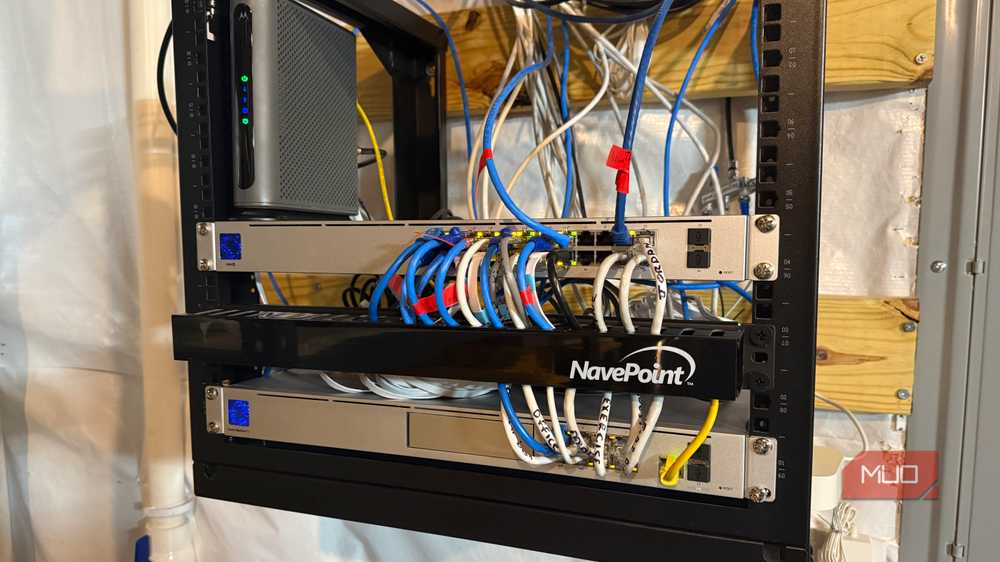
I care more about where that power originates. Every PoE device in my house draws from a single box, a UniFi USW-24-POE with 16 PoE+ ports sharing a 95W budget. Each of those ports can be switched off, switched on, or power-cycled from software.
A wall outlet offers nothing like that. The closest equivalent is a smart plug, and you can’t plug one into a ceiling.
A frozen device is one tap away from a hard reboot
My Echo Hub came back without anyone touching it
Our Echo Hubs are flush-mounted on the walls, and a PoE adapter behind the drywall keeps them running. The day one of the screens locked up and ignored every tap, unplugging it would have required lifting the panel off its mount just to find the cable.
I skipped that. In the UniFi app, I tapped the switch port that feeds the Echo Hub and power-cycled it, and after a brief dark spell on the port, the panel started up just like it does after a real unplug. UniFi’s Restart command sends a request to a device, so it works only on UniFi gear that is still listening. The Echo Hub is an Amazon product the app can’t talk to.
Power-cycling the port skips the request entirely and removes the power, which works on any PoE device, frozen or not. The same option works away from home when your console has remote access turned on.
Name your ports in the app before you need this, so you never cut power to an access point when you meant to reboot a camera.
One battery backup covers everything the switch powers
The UPS at the rack reaches every ceiling
A few months ago, I added a compact CyberPower UPS to my network rack so short power blips would stop knocking my network offline. Because the switch is on that battery, it covers everything it powers, too.
Those all stay on, including the four access points and my Echo Hubs. A flicker of the lights doesn’t drop Wi-Fi, our phones don’t jump over to cellular, and I can still control lights and check cameras from that wall panel.
With outlet-powered gear, you would need a separate battery at each location or accept that those devices drop with every outage. With PoE, all of that protection lives on a single basement shelf.
There is a catch. Your router, switch, and every PoE device pull from the same UPS battery, and each added watt cuts into runtime, so factor that in as you add hardware.
The switch shows what every device draws
A power budget you can see before you hit it
A managed PoE switch reports how much power each port is pulling and how much of the total budget remains. In the UniFi app, you can watch an access point’s draw next to everything else on the switch.
That visibility matters most when you add hardware. Each PoE+ port can deliver up to 30W, but the switch can’t give every port its maximum at once, since all 16 ports share the 95W pool. I plan to run PoE cameras through an existing pull tube in the attic, and checking how much headroom remains comes before buying anything.
The numbers help with troubleshooting too. A port drawing far more or less than usual points straight to the device that needs attention.
What you need to get this control
A managed PoE switch and solid copper cable
Unmanaged PoE switches and basic injectors still deliver power, though you lose the app, port-by-port control, and power readings. Remote power cycling requires a managed switch whose software exposes PoE port controls. UniFi does, and so do other managed lines such as Zyxel’s Nebula. Confirm the specific model before you buy.
Devices without PoE support can still join through a splitter, which is how my Echo Hub gets its power. The cable needs attention as well. Copper-clad aluminum cable runs hotter under PoE loads, so use pure copper for any run that carries power.
A PoE access point also beats any Wi-Fi extender if spotty coverage is what pushed you toward Ethernet, and you get the same remote reboot for your Wi-Fi.

- Number of Outlets
-
8
- Cord Length
-
5 ft
Pick your next switch by its ports, not its speed
Speed is the reason most people run Ethernet, and it’s still the most important. The feature I would miss first, though, is control. With one managed PoE switch, I can restart a locked-up wall panel from my phone, ride out power blips across every access point on a single battery UPS backup, and see each device’s exact draw. Before buying a switch, look at three things: its PoE port count, its total power budget, and whether the app can cycle a single port. They’ll matter more to your home network than the gigabit number on the box.