Many premium headphones and even earbuds support higher codecs for listening in true hi-res. Of course, you need to be listening from a hi-res audio source, like the top-tier Spotify subscription or from a service like Tidal.
But even when you think you’re listening to audio at the highest spec your headphones support, you might not be, when choosing the appropriate service. Your smartphone, if that’s what you’re using, must also support that spec. And in many cases, you need to adjust audio quality in the headphones app to turn it on as well.
Wait, can my phone support that?
Check the specs
Every smartphone supports playback of audio files in a specific codec. Many of the latest premium Android phones natively support FLAC or ALAC audio files up to 32-bit/192kHz. Apple iPhones, meanwhile, support ALAC up to 24-bit/192kHz. If you connect via cable and add a portable DAC to the equation, you get the best possible audio quality. Meanwhile, for wireless streaming, if both the phone and the headphones support LDAC, aptX HD, or aptX Lossless, you can listen at that quality. Note that iPhones only support AAC quality via Bluetooth. In some cases, you may need to enable developer mode on the phone to manually switch to a different Bluetooth codec. On a device like the Samsung Galaxy S26 Ultra, go to About phone -> Software information -> Build number 7 times in rapid succession to enable Developer mode. From there, you can return to the main settings and open the Developer options tab to adjust the Bluetooth Audio Codec. Run a quick search to find out how to do this with other Android devices.
You may also get support for technologies like Dolby Atmos for more immersive audio, and even head tracking, so the sound stays centered no matter how you move your head. You can usually check the audio quality in the settings menu of your device. For Apple Music on iPhone, for example, go to Settings -> Apps -> Music -> Audio Quality, then make sure Lossless is turned on. (You may want to keep this off when you’re streaming over the cellular network if you have a limited data plan). You can also keep Dolby Atmos always on or automatic, so it kicks in when a track and your headphones support it.
The headphones app lets you choose
It might be buried in settings
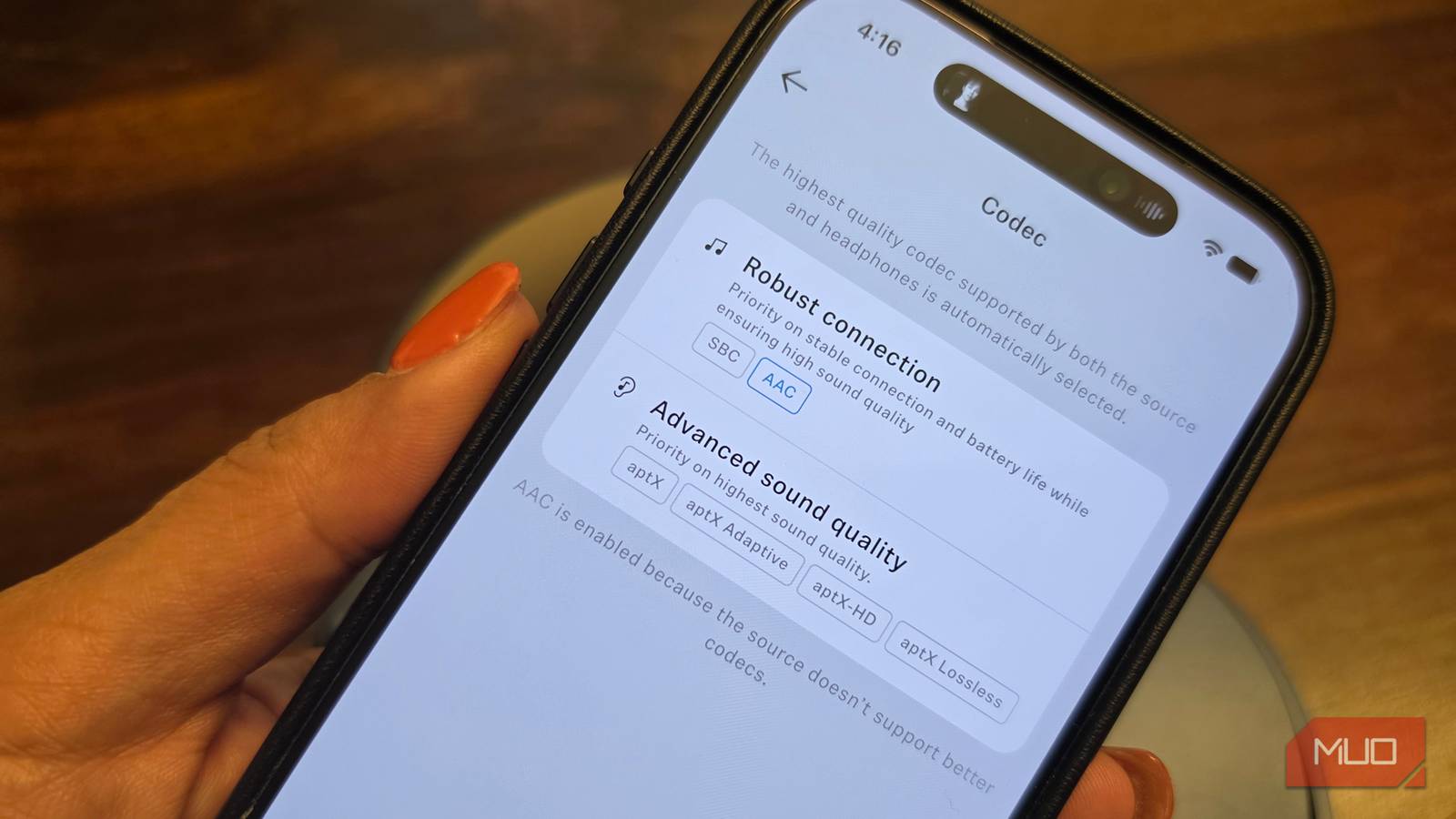
If you have a pair of premium headphones from a brand like Sennheiser, the app will typically include an option to adjust settings. If your connected device does not support that audio quality, it will be faded out, and you won’t be able to select it. For example, let’s consider the Sennheiser Momentum 5 Wireless headphones, which are Hi-Res Audio certified and can support up to aptX Lossless audio. The app auto-adjusts the codec to the highest one supported by both the headphones and the source device. When I connect them to a Samsung Galaxy phone, I get aptX quality with compatible audio sources. But when connected to my iPhone, only AAC is available. The app notes that the source doesn’t support better codecs.
With most earbuds and headphones that offer advanced codecs for hi-res listening, you’ll find a similar option in the settings to adjust the codec if it isn’t automatically selected at the highest option by default. But, as noted, if your phone doesn’t support the higher codec, you can’t enjoy it. Think about when you plug a phone that supports 25W charging into a portable charging brick that supports up to 45W. It will work, but the phone will only charge at the speed it’s capable of. In the same way, headphones will only play back the highest audio quality available from the content that the device they’re connected to can support.
Headphones only play hi-res with compatible devices and sources
Make sure there are no breaks in the chain

While you might be enticed by the specs noted on a pair of premium headphones, support has to be provided across the board. Without doing so, it’s like subscribing to Netflix Premium with 4K video quality, then watching on a tiny phone screen or an old 1080p TV. You might be watching a source that’s available in 4K, but you’re not actually enjoying it in 4K. So, verify which audio codecs your smartphone, tablet, or other device you plan to connect the headphones to supports to know the limits.
There are workarounds to fully enjoy lossless audio, such as using a USB-C DAC that bypasses the phone’s built-in DAC and converts the audio to a higher-resolution format. If you want to unlock the best possible sound from a pair of headphones, connect them via USB-C or 3.5mm cable instead of using wireless. The aforementioned Momentum 5 Wireless headphones come with both cables in the box, as do another favorite pair of mine, the Bose QuietComfort Ultra 2 headphones. So, before you pick up a pair of hi-res headphones, consider if your phone can support the highest quality. And if so, check both the phone’s settings and the headphones to ensure you’re using them.