Every time Chrome connects to a website, it sends along a short line of text identifying the browser, operating system, and device it is running on. This is called a user-agent string, and websites use it to decide what version of a page to serve. Chrome’s introduction, however, reads like an identity crisis.
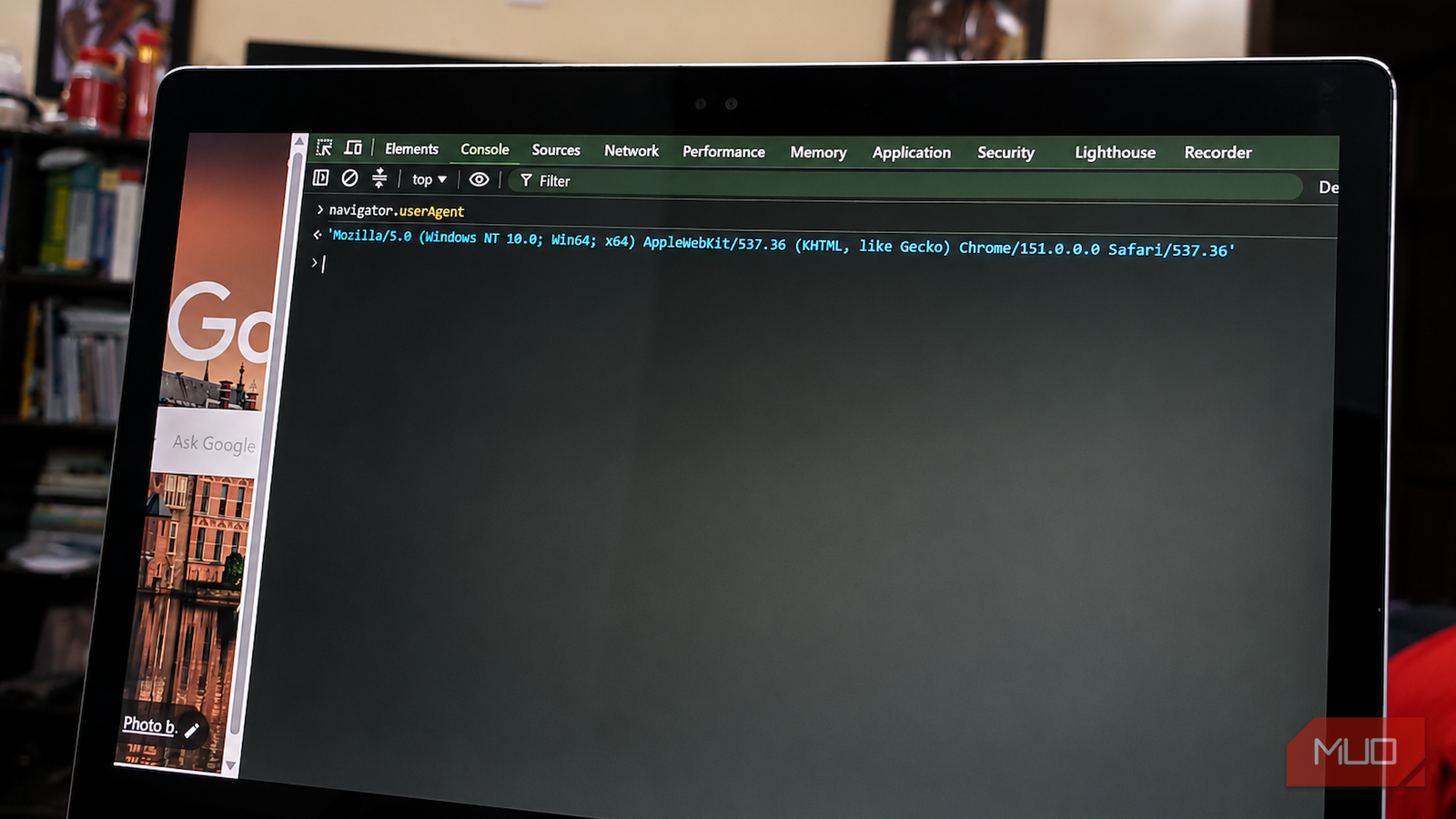
Open Chrome, press F12 (or Ctrl + Shift + I), navigate to the browser’s Console tab, type navigator.userAgent, and press Enter to read what comes back. Some laptops require Fn + F12 instead. On my Windows machine, the resulting string looks like this:
Mozilla/5.0 (Windows NT 10.0; Win64; x64) AppleWebKit/537.36 (KHTML, like Gecko) Chrome/151.0.0.0 Safari/537.36
The Chrome version will change, but the rest of the structure has barely moved. Chrome appears to introduce itself as Mozilla. It mentions AppleWebKit, adds that it is “like Gecko,” the engine powering Firefox, and signs off with Safari. Somewhere near the end, almost as an afterthought, it finally mentions Chrome.
Strictly speaking, these are compatibility tokens rather than complete declarations of identity. Chrome is not genuinely claiming to run several competing browser engines at once. Still, none of those names are a typo. Each was inherited to satisfy websites that expected to see it, and removing one could cause pages to behave differently.
To understand why this bloated text exists, you have to dig down to the earliest years of the graphical web.
Mozilla became the web’s first browser password
Mozilla was an internal joke that never got cleaned up

NCSA Mosaic was one of the first graphical browsers to achieve widespread use, and it identified itself as NCSA_Mosaic/2.0. Its user-agent string was relatively simple because browser sniffing had not yet become a standard way for websites to determine which features a visitor was allowed to access.
Then Netscape Navigator arrived. Its internal project codename was Mozilla, a combination of “Mosaic killer” and “Godzilla,” and its user agent began with Mozilla/1.0. Netscape introduced features that Mosaic lacked, including HTML frames, which allowed multiple documents to appear within a single browser window.
Mosaic could not render those frame-based layouts as intended, so some websites and server-side scripts began checking the user-agent string. Visitors whose browsers began with “Mozilla” received the newer experience, while everyone else received a simpler alternative or an unsupported browser message.
That habit changed what a user-agent string represented. Instead of merely describing the software making a request, it became a password that browsers needed to present before websites would unlock particular features.
Internet Explorer decided to just say it was Netscape
Mozilla/2.0 (compatible; MSIE 3.0)

When Internet Explorer gained support for features such as frames, it encountered websites that treated the Mozilla prefix as evidence that a browser could handle their more advanced pages. A browser with an unfamiliar identifier risked receiving a stripped-down page or being rejected before the website tested what it could actually do.
Microsoft used a blunt but effective workaround. Internet Explorer placed Netscape’s Mozilla identifier at the beginning of its user-agent string, then disclosed its real identity inside parentheses. Internet Explorer 3 used a string resembling this:
Mozilla/2.0 (compatible; MSIE 3.0; Windows 95)
A server performing a crude check saw “Mozilla” and allowed the browser through. More careful scripts could continue reading, locate MSIE, and correctly identify Internet Explorer. The misleading prefix preserved compatibility, while the information in parentheses conveyed the truth.
That compromise helped establish an enduring browser convention: begin with the compatibility token websites expected, then append enough real information for more careful scripts. Later browsers adopted increasingly crowded identity strings because accurately identifying themselves risked triggering outdated compatibility checks and breaking websites.
That fragility remained visible decades later, when Chrome 100 and Firefox 100 threatened to break websites whose parsers assumed browser versions would always contain two digits.
Safari kept the Mozilla badge and borrowed Gecko’s name
KHTML wearing a Gecko name tag

The Mozilla project later built its browser platform around Gecko, one of the few browser engines not controlled by Google or Apple. Firefox genuinely uses Gecko, but its user-agent string still begins with Mozilla/5.0 because that prefix had become a general compatibility badge. Developers also began using the presence of Gecko as a shortcut for deciding whether a browser could receive pages written for modern, standards-focused engines.
Safari faced a more complicated problem when Apple launched it in 2003. Its WebKit engine had been forked from KDE’s KHTML, so it was technically neither Netscape nor Gecko. In practice, however, Safari needed to pass compatibility checks written for both.
Apple solved this by giving Safari a user-agent string that invoked several browser lineages without fully claiming any of them:
Mozilla/5.0 (Macintosh; ...) AppleWebKit/85.7 (KHTML, like Gecko) Safari/85.8
WebKit developers have repeatedly documented how user-agent checks can break otherwise compatible websites, leaving tokens such as (KHTML, like Gecko) difficult to remove safely. The Mozilla prefix remained for the same broader compatibility reason. What looked like a misleading description had become non-optional compatibility code.
KHTML, like Gecko may be the most candidly misleading phrase in browser history. It effectively says, “I am not Gecko, but please behave as though I am.”
Chrome inherited every layer and added Chrome
The Safari at the end is load-bearing

Google launched Chrome in 2008 using WebKit, the same rendering engine behind Safari. By then, some websites had built WebKit-specific code paths that looked for the word Safari before serving the expected version of a page. Removing that token would have broken sites that already worked, so Chrome kept Safari’s user-agent structure and inserted its own Chrome/x.x.x.x identifier ahead of it.
The resulting string preserved another fossil in the form of AppleWebKit/537.36. Chrome moved from WebKit to the Blink rendering engine in 2013, but Chromium retained both AppleWebKit/537.36 and Safari/537.36 for compatibility. Those tokens no longer describe Chrome’s actual rendering engine, yet changing the established format could confuse scripts written around the old structure.
The inheritance now runs several layers deep. Chrome carries identifiers inherited from Safari, Safari’s string refers to KHTML and says it is like Gecko, and the entire chain still begins with Mozilla. Microsoft’s Chromium-based Edge adds another layer by appending Edg/ to a Chrome-style user-agent string that already contains all of the above.
Browsers are finally trying to unwind this
Reduced UA and Client Hints, twenty years late
The user-agent string is now poor at precisely identifying a browser, yet it still contributes to browser fingerprinting that can identify you even with a VPN, because operating system, device, architecture, and version details help distinguish one user from another. Google began rolling out User-Agent Reduction in 2022 to limit the information available. Chrome now freezes or removes much of the detail, reporting a simplified platform and a generic minor version such as 151.0.0.0.
Chromium-based browsers supplement the reduced string with User-Agent Client Hints. On secure requests, Chromium supplies low-entropy information such as the browser brand, major version, platform, and whether the device is mobile by default. A server must explicitly request more identifying, high-entropy details such as the full browser version, device model, processor architecture, or precise operating-system version, and the browser can restrict what it returns.
Firefox and Safari have taken their own approaches to reducing user-agent information. Firefox freezes or obscures some platform details, while Safari has also frozen reported operating system versions. Neither has adopted Chromium’s Client Hints system, and both continue to encourage developers to test whether a feature is supported instead of trying to identify the visitor’s browser.
Reduction can remove identifying details, but it cannot safely erase the historical compatibility tokens surrounding them. Too many websites, enterprise filters, libraries, and analytics tools may still expect the old structure.
The password nobody can change
Much of Chrome’s user-agent string points to software it no longer uses directly. Netscape is gone, KHTML is an ancestor rather than Chrome’s engine, and AppleWebKit/537.36 has remained in the string even though Chrome moved to Blink in 2013.
The string survives because it stopped being a straightforward description almost as soon as websites began checking it before deciding what to send. At that point, it became a credential, and credentials get copied forward by everyone who still needs to get in. Chrome says it is Mozilla for the same reason a thirty-year-old function still has a parameter nobody dares remove.
Somewhere in the web’s accumulated code, a compatibility check written for the age of frames is probably still deciding what a browser gets to see.